See Equipment Last Inventory No. and Search form.
In the context of using a GIS ArcGIS® or MapGuide®, you can search for equipment using a Map.
By clicking on the icon  you can directly access the GIS map to select one or more geolocated pieces of equipment.
Search for linear equipment
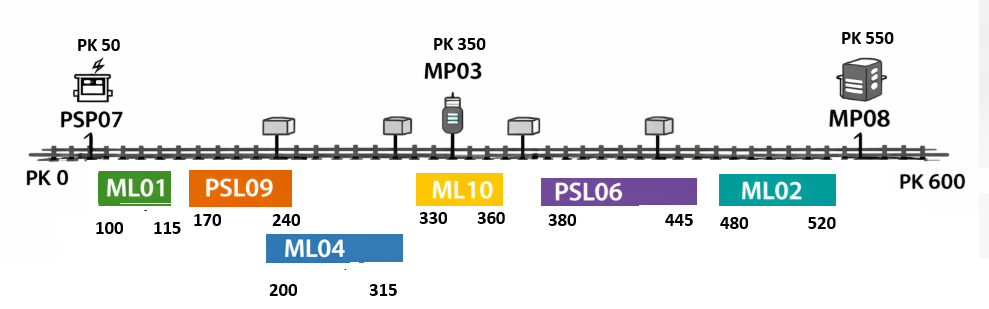
This section describes the use cases for search fields related to Pks.
Case 1: Search for equipment included in a specified segment
If you want to search for all equipment between Pk 200 and Pk 400, you must enter the Pks as follows:- Minimum starting price = 200
- Pk end max = 400
The equipment in question is MP03, ML04, and ML10
Case 2: Search for equipment with a weight less than or equal to a given Pk
If you want to search for all equipment with Pk values less than or equal to Pk 150, you must enter the Pk values as follows:- Why is the start time set to 0 or empty?
- Pk end max = 150
The equipment in question is PSP07 and ML01
Case 3: Search for equipment with a power rating greater than or equal to a given horsepower
If you want to search for all equipment with Pk values greater than or equal to Pk 400, you must enter the Pk values as follows:- Starting price = 400
- Pk end max empty
The equipment in question is ML02 and MP08
Case 4: Search for all equipment associated with a specific Pk
If you want to search for all equipment affected (entirely or partially) by a specific Pk (Pk 350), you must enter the Pks as follows:- Max starting price = 350
- Pk end min = 350
The equipment in question is ML10 and MP03
Case 5: Search for all equipment located entirely or partially within a given segment
If you want to search for all equipment that falls entirely or partially within the PKS range of 250 to 350, you must enter the PKS values as follows:- Max starting price = 350
- Minimum order quantity = 250
The equipment in question is ML04, MP03, and ML10