CARL Source provides an API that allows an external website, displayed via an iFrame, to communicate with CARL Source and with the page that embeds that external website.
This page describes a mechanism that allows an external website, displayed in a CARL Source iFrame, to communicate with CARL Source via REST APIs, without requiring the user to reconnect.
This mechanism uses an API ("/api/auth/v1/me"), and HTTP CORS header management.
CORS authorization for the external website
As default, browsers block all "cross domains" HTTP queries, i.e. queries from different websites.
To allow this communication, and to allow the browser to propagate the user's identity to the external website, you must specify this domain in a CARL Source system setting.
In the "System" module, go to the "System configuration" feature and in the "Authentication" section, enter the list of domains authorized to communicate with CARL Source in the "crossOriginAllowedDomains" setting.
The domains must be indicated with the https protocol (only the secure protocol allowing "cross domains" exchanges) and if necessary the port used. The domains declared must be separated by commas.
For example: https://externalSite1:8888,https://externalSite2
Creating a widget on the home screen
To illustrate the example, we add a widget of the "External website" type to the home screen.
This widget will display our external website ("https://externalSite1:8888"), also indicating via, a URL setting (in this case, for example, "csUrl"), the base URL where the CARL Source instance is deployed.
This is needed if the external website does not statically know the address of the CARL Source instance, or if it can work on a multi-tenant basis for multiple CARL Source instances.
Indeed there is no reliable way for a website embedded in an iFame to retrieve the address of the container website, irrespective of the browser.
For further details on this type of widget, please refer to the Site component section.
Examples of pages communicating with CARL Source
This chapter describes, by way of example, an HTML page and JavaScript code that retrieves information about the logged-in user from CARL Source, and calls CARL Source's REST APIs in order to obtain additional information (for example, the user's website, their email address, etc.).
The HTML page (representing the external website) displayed in the widget:
| HTML page example |
Copy the code
|
|---|---|
<!DOCTYPE html> <html> <body> <script src="carlsource.js"></script> <h1>Landing page</h1> This is a landing page which can be embedded inside an iframe in CARL Source. This page can interract with CARL Source through its REST APIs with automatic transmission of connected user credentials. CORS requests <b>MUST</b> be enabled for this page domain through CARL Source system parameter: <b>"Authentication" > "crossOriginAllowedDomains"</b> <h2>Origin</h2> <ul> <li>Location: <tt id="locationTag">Waiting...</tt></li> <li>CARL Source location: <tt id="csUrlTag">Waiting...</tt></li> </ul> <h2>Currently connected user info</h2> <pre id="resultMe">Waiting...</pre> <h2>Actor info</h2> <pre id="resultActor">Waiting...</pre> <script> fetch_data(); </script> </body> </html> |
|
The JavaScript code that retrieves the information and calls CARL Source's REST APIs:
| carlsource.js |
Copy the code
|
|---|---|
// Fetch CARL Source data and display them on page placeholders.
function fetch_data() {
  // Retrieve current page location URL.
  const currentPageLocationUrl = new URL(window.location.href);
  // Display it on page.
  document.getElementById("locationTag").innerText = currentPageLocationUrl.toString();

  // Extract CARL Source base URL from current page parameter.
  // There seams to be no reliable way to get caller's URL, so it's given by caller with parameter.
  if (currentPageLocationUrl.searchParams.has("csUrl")) {
    const csUrl = currentPageLocationUrl.searchParams.get("csUrl");
    // Normalizing URL by removing last "/" if any.
    const normalizedUrl = csUrl.endsWith("/") ? csUrl.substring(0, csUrl.length - 1): csUrl;
    // Display given CARL Source base URL.
    document.getElementById("csUrlTag").innerText = normalizedUrl;
    // Then fetch CARL Source data through APIs.
    fetch_user_data(normalizedUrl);
  } else {
    // No CARL Source URL parameter, stop here.
    document.getElementById("csUrlTag").innerText = "Missing csUrl parameter !";
  }
}

function fetch_user_data(carlSourceLocation) {
  // Ensures the HTTP request is done with a CORS preflight request (mode: cors),
  // then the real request is done with browser sending the session cookie (credentials: include).
  const fetchOptions = { mode: "cors", credentials: "include" };

  // Get currently connected user data.
  fetch(carlSourceLocation + "/api/auth/v1/me", fetchOptions)
    .then((meResponse) => meResponse.json())
    .then((meJsonResponse) => {
      // The "/me" response provides ids for user, actor, and current session values. Display it.
      document.getElementById("resultMe").innerText = JSON.stringify(meJsonResponse, null, 2);
      // Query the "/actor" API to get data, useful for this page, which may be stored
      // in its xtraFields.
      const actorUrl = carlSourceLocation + "/api/entities/v1/actor/" + meJsonResponse.actorId
        + "?include=phones";
      return fetch(actorUrl, fetchOptions);
    })
    .then((actorResponse) => actorResponse.json())
    .then((actorJsonResponse) => {
      // Display "/actor" response.
      document.getElementById("resultActor").innerText = JSON.stringify(actorJsonResponse, null, 2);
    });
}
|
|
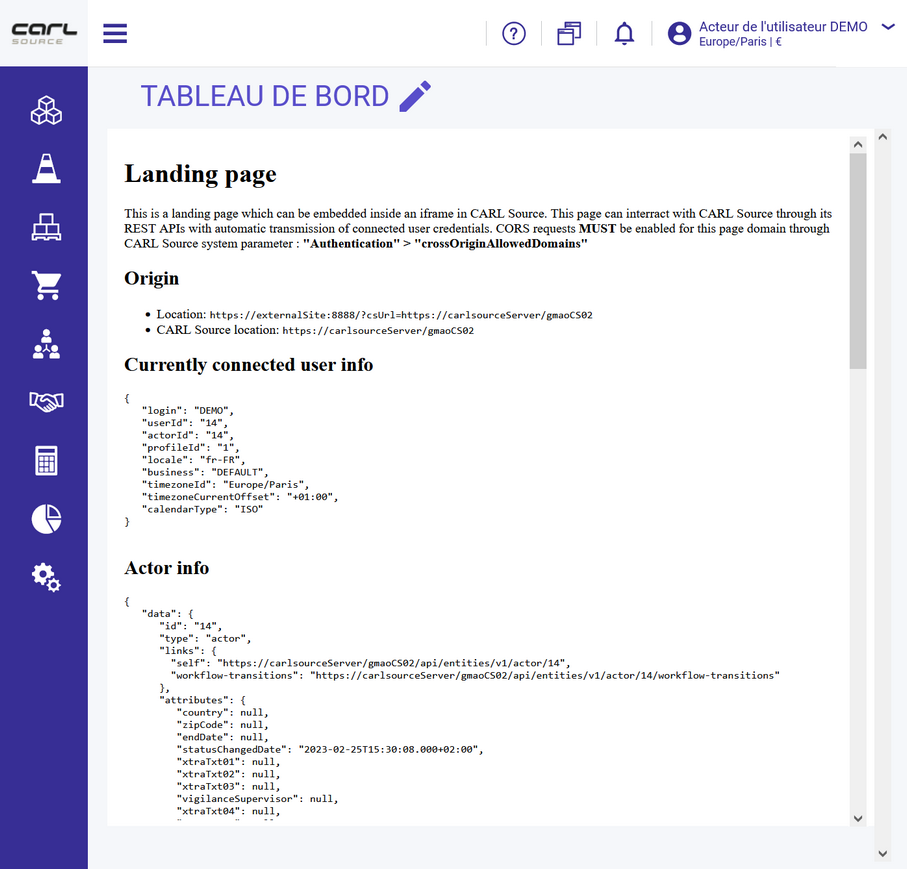
Result
The following screenshot shows the result, with the information obtained from the external website.