Principes de fonctionnement (Connecteur standard)
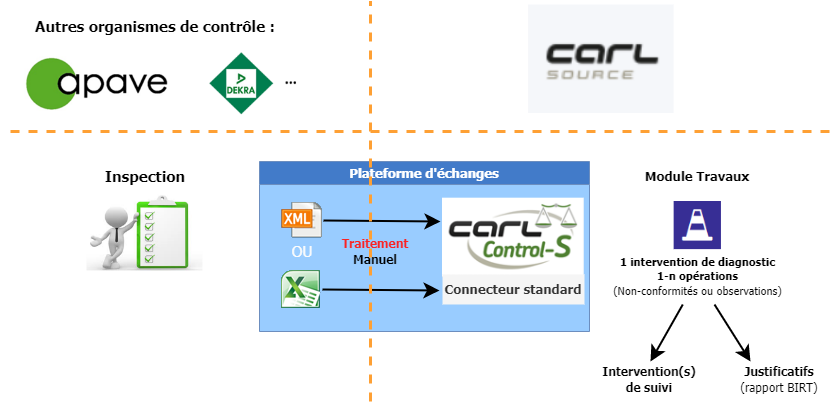
Les fichiers CSV et XML à importer doivent obligatoirement correspondre à un bon format :
- Les fichiers CSV doivent respecter la norme standard WOEXTPROVIDER_1.0 décrit dans CARL Source,
- Les fichiers XML doivent respecter l'objet d'intégration WOEXTPROVIDER décrit dans CARL Source.
Fichier CSV
Le fichier transmis doit respecter la norme standard WOEXTPROVIDER_1.0 prévue à cet effet dans CARL Source.
Cette norme décrit les types d'enregistrement suivants :
- Les informations de l'intervention de diagnostic,
- Les observations (c'est à dire les opérations de l'intervention),
- La description de chacune des observations,
- Les solutions suggérées pour chacune des observations,
- Le rapport au format PDF.
| Exemple de fichier CSV |
Copier le code
|
|---|---|
WOEXTPROVIDER;DUB003;DUB003;DOMAIN1;2020-04-03 00:00:00;PROVIDER1;LIMONEST; contrôle des portes coupe-feu;OK;2020-04-03 00:00:00;2020-04-03 00:00:00 OBSEXTPROVIDER;BARCODE11;BOOKMARK11;EQPTREFVENDOR11;NOK;2020-04-01 00:00:00;MATERIALCODE11;2020-04-01 00:00:00;OBSERVATIONID11;SERIALNUMBER11;LOCATIONCODE11;LOCATIONOBS11;true;REGULATIONITEM111;REGULATIONITEM211;REGULATIONITEM311;REGULATIONITEM411 OBSDESC;OBSDESCRIPTION11; PRECONIZATION;PRECONIZATION11; OBSEXTPROVIDER;BARCODE12;BOOKMARK12;EQPTREFVENDOR12;RES;2020-04-01 00:00:00;MATERIALCODE12;2020-04-01 00:00:00;OBSERVATIONID12;SERIALNUMBER12;LOCATIONCODE12;LOCATIONOBS12;true;REGULATIONITEM112;REGULATIONITEM212;REGULATIONITEM312;REGULATIONITEM412 OBSDESC;OBSDESCRIPTION12; PRECONIZATION;PRECONIZATION12; |
|
Fichier XML
Le fichier transmis doit respecter l'objet d'intégration WOEXTPROVIDER prévu à cet effet dans CARL Source.
Cet objet s'appuie sur les types d'enregistrement suivants :
- Les informations de l'intervention de diagnostic,
- Les observations (c'est à dire les opérations de l'intervention),
- La description de chacune des observations,
- Les solutions suggérées pour chacune des observations,
- Le rapport au format PDF.
| Exemple de fichier XML |
Copier le code
|
|---|---|
<?xml version="1.0" encoding="UTF-8" ?> <entities externalSystem="EXTSYS-STD" exchangeInterface="WOEXTPROVIDER_XML_IN"> <WOExtProvider> <woextprovider_workId>int : 11769309372021L / rapp : 11769309372021L001TCTH001#1</woextprovider_workId> <woextprovider_workCode /> <woextprovider_workDomain>THERMIQUE</woextprovider_workDomain> <woextprovider_requestDate>2021-06-01 15:16:54</woextprovider_requestDate> <woextprovider_provider>APAVE</woextprovider_provider> <woextprovider_site>C.L.J.T.</woextprovider_site> <woextprovider_workDescription>THERMIQUE - VERIFICATION DES INSTALLATIONS DE CHAUFFAGE, VM</woextprovider_workDescription> <woextprovider_workComment>Site : C.L.J.T. / Adresse : / CP : 75017 / Commune : PARIS<br/> Réf. Client : / Lib. Client :</woextprovider_workComment> <woextprovider_workDateBegin>2021-04-08 00:00:00</woextprovider_workDateBegin> <woextprovider_workDateEnd>2021-04-08 00:00:00</woextprovider_workDateEnd> <woextprovider_materialCode /> <woextprovider_boxMainCode /> <woextprovider_boxLocationCode /> <woextprovider_reports> <reportExtProvider> <reportextprovider_nom_rap>11769309372021L001TCTH001</reportextprovider_nom_rap> <reportextprovider_rap_date_premiere_diffusion>-- 00:00:00</reportextprovider_rap_date_premiere_diffusion> <reportextprovider_nom_rapport>117693.09.37.21.L.001.TCTH.001.PDF</reportextprovider_nom_rapport> </reportExtProvider> </woextprovider_reports> <woextprovider_observations> <obsExtProvider> <obsextprovider_barCode /> <obsextprovider_bookMark>Obs . N° 1</obsextprovider_bookMark> <obsextprovider_eqptRefVendor>Réseau combustible/Examen documentaire/Dossier technique</obsextprovider_eqptRefVendor> <obsextprovider_evaluation>3</obsextprovider_evaluation> <obsextprovider_firstyearObservation>2020-01-01 00:00:00</obsextprovider_firstyearObservation> <obsextprovider_materialCode /> <obsextprovider_obsDate>2021-04-08 00:00:00</obsextprovider_obsDate> <obsextprovider_observationDescription> <description>Dossier technique/à l accueil/Dossier technique/Document non présenté</description> </obsextprovider_observationDescription> <obsextprovider_observationId>342072074</obsextprovider_observationId> <obsextprovider_preconization> <description /> </obsextprovider_preconization> <obsextprovider_serialNumber /> <obsextprovider_locationCode /> <obsextprovider_locationObs>à l'accueil</obsextprovider_locationObs> <obsextprovider_recurrent>true</obsextprovider_recurrent> <obsextprovider_regulationItem1 /> <obsextprovider_regulationItem2 /> <obsextprovider_regulationItem3 /> <obsextprovider_regulationItem4 /> </obsExtProvider> </woextprovider_observations> </WOExtProvider> </entities> |
|
Import manuel
L'import manuel des rapports de contrôle s'effectue à partir de la fonctionnalité Interventions via l'action Import de rapports de contrôle.
Import automatique
Dans ce mode, aucune visualisation au travers de l’IHM ne sera proposée.
Les traitements sont alors programmés au travers d’un Traitement automatique à déclarer dans le module système.
Un traitement automatique doit être créé et configuré pour chaque Prestataire.
La classe associée au traitement automatique se nomme : PROVIDCTRLIMPORTJOB.
Le traitement automatique s’appuie sur un système externe avec l’interface WOEXTPROVIDER_IN (pour les fichiers au format XML) ou WOEXTPROVIDER_IN_CSV (pour les fichiers au format CSV) et un point de connexion.
Le fichier (CSV ou XML) doit être présent dans le répertoire lié au point de connexion associé au prestataire (serveur CARL Source, SFTP interne ou directement pointer sur le SFTP du prestataire).
La configuration de ce traitement se fait au travers de ces paramètres :
- Code du prestataire : code du prestataire (Fournisseur) déclaré dans CARL Source.
- Code de l'organisation : code de l'organisation sur laquelle seront générées les interventions
- Chaine d'authentification : mot de passe simple (en clair) ou crypté (crypt:........) de l'utilisateur exécutant ce traitement.
Doit obligatoirement correspondre à un utilisateur utilisant une authentification interne.