

1. Purpose
This guide aims to familiarise you with the use of the REST APIs offered by CARL Source, based on practical examples.
2. Overview
Most applications encapsulate calls to REST APIs in the language of your choice, but it is important to be familiar with the HTTP methods of the underlying API.
We will therefore use cURL to interact with the APIs.
2.1. Prerequisites
-
The connection between your workstation and CARL Source must be encrypted: Indeed, sensitive information (password and protected data) will pass through the network during this tutorial.
The URL used to access CARL Source must therefore start with https://.

|
For these secure exchanges, we recommend using TLS v1.3. Note that TLS versions 1.0 and 1.1 are prohibited. |
-
You must have a valid CARL Source username.
-
Your password must also be valid (i.e. neither «expired» nor «to be changed»).
To check, connect to the CARL Source application via the login page.

|
Please note that URLs containing square brackets ( |
2.2. Hello World
Let’s start by making sure that the cURL tool and the API are accessible.
Open a terminal window and enter the following command (adjust the values in red):
> curl https://carlsource.server.com/gmaoCS02/public/status
status: ok
The response is a single line of text status: ok, which confirms that CARL Source is properly installed and accessible via the URL entered.
3. Authentication
Authentication information must generally be transmitted in order to use the services.
If, when access to a protected service is requested, the username or password provided is invalid, the API returns an HTTP 401 error (Unauthorized):
> curl -X GET -i https://carlsource.server.com/gmaoCS02/api/entities/v1/mr

HTTP/1.1 401 Unauthorized
{
    "errors" : [ {
        "status" : "401",
        "title" : "Unauthorized",
        "detail" : "Please provide valid authentication credentials"
    } ]
}
Authentication is the key to reading and writing private information via the API.
3.1. Token Authentication
For application needs, sending the username and password information with every interaction with the API can seem cumbersome and increases the risk of password theft.
The best way to handle this situation is to request the application (in this case CARL Source) to generate an access token, then include it in subsequent requests.
This token replaces the direct use of the "username/password" pair and thus prevents exposing this sensitive information at every call.
CARL Source supports two mechanisms for obtaining an access token:
-
CARL Source Token (type (carlsource_auth_v1)): obtained through the service /api/auth/v1/authenticate and sent in the HTTP header X-CS-Access-Token.
-
OAuth2 Token (type (Bearer)): compliant with RFC 6750, obtained through the service /api/oauth2/v1/token and sent in the standard header Authorization: Bearer.
In both cases, the authentication service is called only once to obtain the access token. This token is then used to authenticate all subsequent requests, without needing to resend credentials or authentication information.
> curl -X POST -i --data "login=identifiant" --data "password=mot_de_passe" --data "origin=your_application_identifier" https://carlsource.server.com/gmaoCS02/api/auth/v1/authenticate

HTTP/1.1 200
{
    "X-CS-Access-Token":"your_access_token",
    "token_type":"carlsource_auth_v1",
    "expires_in":86399911,
    "lang":"fr_FR"
}
> curl -X POST https://carlsource.server.com/gmaoCS02/api/oauth2/v1/token -H "Content-Type: application/x-www-form-urlencoded" -d "grant_type=password" -d "client_id=your_application_identifier"

HTTP/1.1 200
{
    "access_token": "your_access_token",
    "token_type": "Bearer",
    "expires_in": 3600
}

|
The values of the |
The fragment of JSON obtained in return firstly includes the token, which consists of a random sequence of characters.
CARL Source checks the validity of the token, which should be placed in an http query header named X-CS-Access-Token.
The following information is also included in the header:
-
The token type : to date, there are two types of tokens in CARL Source (carlsource_auth_v1) and (bearer).
It is possible that refresh tokens may be available in the future. -
The lifetime of this token (in milliseconds).
Once this time has elapsed, a query made using this token will be rejected.
The lifetime is configurable in the CARL Source system configuration settings. -
The language of the user who requested the token.
This information allows the requesting application to switch to the user’s preferred language as soon as possible (for example, if the user has logged in from a browser configured in a language other than their own).
Note that the language of reference is the one defined for the CARL Source user.
|
|
The language is returned only in the case of a (carlsource_auth_v1) token. |
Once the token has been obtained, it can be used as follows to authenticate a call:
> curl -X GET -H "X-CS-Access-Token: your_access_token" https://carlsource.server.com/gmaoCS02/api/entities/v1/mr
> curl -X GET -H "Authorization: Bearer your_access_token" https://carlsource.server.com/gmaoCS02/api/entities/v1/mr
3.1.1. Special Case of the OAuth2 Token with Assertion JWT
In the case of the OAuth2 mechanism, client authentication relies on a JWT (JSON Web Token) assertion.
The external application builds a signed JWT to prove its identity to CARL Source (OAuth2 server).
CARL Source verifies the signature, validity, and the information contained in this JWT.
If the token is valid, CARL Source returns an OAuth2 access token, which will then be used to consume CARL Source APIs.
-
either with an asymmetric key (algorithm RSASSA-PKCS1-v1_5 + SHA-256),
-
or with a shared key (Pre-Shared Key, PSK, using HMAC + SHA-256).
Its validity period is limited in order to avoid reuse risks (replay attack).
CARL Source therefore checks that the age of the JWT does not exceed the maximum value defined in the system configuration.
3.2. HTTP-BASIC authentication
|
|
HTTP BASIC authentication (Basic Authentication) is not recommended. |
Despite the risks, if you wish to authenticate in this way, you must use a CARL Source username and password.
> curl -u username https://carlsource.server.com/gmaoCS02/api/auth/v1/authenticate
Enter host password for user 'username':
The -u option is used to set a username.
When the command is entered, cURL will ask for the associated password.
The syntax -u "username:password" can be used to avoid the prompt, but this leaves a trace of the password in the terminal log (which is not recommended).
It is also possible to disable this authentication mode by checking the AuthBasicDisabled system parameter in the Authentication section :
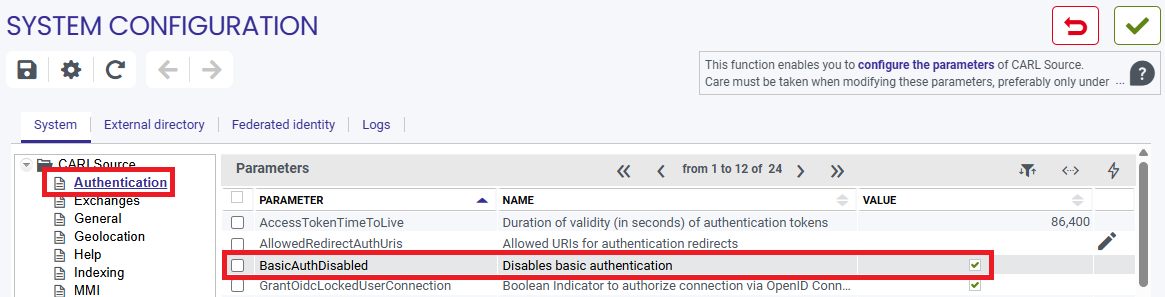
In this case, attempts to access using this method will return an error:
> curl -u username https://carlsource.server.com/gmaoCS02/api/auth/v1/authenticate
Enter host password for user 'username':

{
    "errors" : [ {
     "status" : "401",
     "title" : "Unauthorized",
     "detail" : "Please provide valid authentication credentials"
     } ]
}
3.3. Authentication and security during production
Beyond this tutorial, for which the curl tool is used, an application during production must invoke the authentication service using an http communication library provided by the language in which it is programmed.
One should be very careful about how to invoke this authentication service, as technically there are two different ways to pass the settings login, password and origin to the service /authenticate.
3.3.1. Authentication during production: bad practice
The first way is to pass this information as settings in the URL.
This method is very strongly discouraged for a production application.
POST https://carlsource.server.com/gmaoCS02/api/auth/v1/authenticate?login=LOGIN&password=password&origin=ORIGINIn so doing, critical login and password information will potentially be treated as non-critical data and exposed, especially in log files.
Although technically possible, this practice is strongly discouraged.
3.3.2. Authentication during production: good practice
It is recommended to pass the authentication settings as form data, in the body of the query, and to adjust the Content-Type accordingly using application/x-www-form-urlencoded.
POST https://carlsource.server.com/gmaoCS02/api/auth/v1/authenticate
Content-Type: application/x-www-form-urlencoded

&login=LOGIN
&password=password
&origin=ORIGIN
4. Access rights
API access rights are determined by the rights positioned on each profile in CARL Source.
An overall profile setting, named «JSON-API access» and accessible via the «General» category, governs access to the APIs.
|
|
As default, this setting is set to «Disabled», thereby preventing API access. |
Access to entities via the API is then determined based on the Read/Create/Update/Delete permissions on the functionality related to that entity (other permissions are ignored).
An algorithm applies the following criteria (in order) to link an entity to its functionality:
-
Retrieve the FunctBean.entity attribute which directly indicates whether the entity is referenced by the functionality.
-
If the entity does not have a referenced feature: browse the relationships between entities; the entity is linked to another entity whose feature has been identified. In such cases, an entity may be indirectly referenced by several features.
-
If, after this traversal, certain entities are still not associated with a functionality, the information must be entered in ObjectInfoBean.relatedFunctionality.
|
|
|
The following HTTP codes are returned if the access rights are insufficient:
-
403 – indicates that the profile does not have the necessary permissions for this entity:
-
either in terms of the overall setting «JSON-API access» (see above),
-
or in terms of permissions on the associated functionality,
-
or because there is no associated functionality.
-
-
501: indicates that the entity is only accessible in read-only mode, and therefore that POST/PUT/PATCH/DELETE operations cannot be performed on it.
5. Limit
The configuration parameter ApiMaxResults indicates the maximum number of items that a page can return in a Rest API call.
The maximum value is set to 500. Indeed, this parameter directly affects the memory consumed by the application; a value that is too high could quickly lead to saturation and cause the application to stop.
When the number of returned items exceeds 500, pagination must be used.
Pagination is used to divide a large data set into several smaller "pages" to avoid loading everything at once.
Each API call reads part of the data from the database (the beans) and then transforms them into entities — the actual objects returned.
Since some filters are applied after reading the beans and some entities come from collections, the exact number of items per page may vary.
Pagination is managed using the parameters limit and offset:
-
limit specifies the number of items desired on the page (e.g. 100 results).
-
offset specifies the number of items to skip before retrieving the desired items (e.g. to go to the next page).
Examples:
curl -X GET -H "X-CS-Access-Token: your_access_token" "https://carlsource.server.com/gmaoCS02/api/entities/v1/mr?limit=100&offset=0"
curl -X GET -H "X-CS-Access-Token: [red]#your_access_token#" "https://carlsource.server.com/gmaoCS02/api/entities/v1/mr?limit=100&offset=100"
curl -X GET -H "X-CS-Access-Token: [red]#your_access_token#" "https://carlsource.server.com/gmaoCS02/api/entities/v1/mr?limit=100&offset=200"
|
|
With the OData option, the parameters used to handle pagination are different; in this case, API calls must use $top and $skip instead of limit and offset. Example OData API call
curl -X GET -H "X-CS-Access-Token: [red]#your_access_token#" "https://carlsource.server.com/gmaoCS02/api/odata/v1/WOPROCESS?$top=200&$skip=300 |
6. Business scenario: the /entities API
Now that your installation is working and you know how to access protected services using the authentication system of your choice, you will be able to interact with CARL Source business objects.
The scenario below shows how to create and manipulate work requests, a key concept of CARL Source, via the /entities API.
Technically, this is a REST - HATEOAS API, based on the Crnk library, which in turn implements the JSON-API specification.
6.1. Anatomy of a call
To get started, let’s list the existing work requests in CARL Source.
To do this, we simply need to know the code used to refer to work requests in CARL Source.
This code is mr (we will come back to this later).
> curl -X GET -H "X-CS-Access-Token: your_access_token" https://carlsource.server.com/gmaoCS02/api/entities/v1/mr
|
|
To be accessible through the API /entities, in read/edit/create/delete mode, attributes must have the Exported in XML format property checked or null in the CARL Source dictionary. Changing the value of the Exported in XML format property
curl -X POST -i -H "X-CS-Access-Token: your_access_token" https://carlsource.server.com/gmaoCS02/api/entities/v1?rebuildAPIs |
Before we run this command, let’s take a closer look:
-
the first parameter -H 'X-CS-Access-Token" is used to specify the token previously obtained (see Token Authentication), in order to authenticate using the Custom Header Token method,
-
The rest of the PO invokes the REST service responsible for listing work requests (mr).
This URL can be broken down as follows:
-
https://carlsource.server.com: the first part of the URL corresponds to the address of the CARL Source server.
-
/gmaoCS02: indicates the context of the CARL Source web application.
-
/api: specifies that we want to access a CARL Source REST API.
-
/entities/v1/: we are calling the /entities API, and specifically the first version (/v1).
-
/mr: we wish to access the mr entity type, i.e. work requests.
If no further information is provided, CARL Source returns a list of all work requests (in JSON format).
Here is an excerpt from the response:
> curl -X GET -H "X-CS-Access-Token: your_access_token" https://carlsource.server.com/gmaoCS02/api/entities/v1/mr

HTTP/1.1 200
{
    "data" : [ {
        "id" : "DI-1",
        "type" : "mr",
        "attributes" : {
            "code" : "DI-001",
            "statusChangedDate" : "2018-10-19T15:31:21.495+02:00",
            "description" : "Chauffage / Climatisation salle de réunion direction",
            "expEnd" : "2018-10-20T15:31:21.495+02:00",
            "SRID" : 0,
            "amount" : 0.0,
            "creationDate" : "2018-10-19T15:31:21.495+02:00",
            "workRecept" : true,
            "workPriority" : "HIGH",
            "eqptBroken" : true,
            "statusCode" : "REQUEST"
        },
        "relationships" : {
            "address" : {
                "links" : {
                    "self" : "https://carlsource.server.com/gmaoCS02/api/entities/v1/mr/DI-1/relationships/address",
                    "related" : "https://carlsource.server.com/gmaoCS02/api/entities/v1/mr/DI-1/address"
                }
            },
            "symptom" : {
                "links" : {
                    "self" : "https://carlsource.server.com/gmaoCS02/api/entities/v1/mr/DI-1/relationships/symptom",
                    "related" : "https://carlsource.server.com/gmaoCS02/api/entities/v1/mr/DI-1/symptom"
                }
            },
            "site" : {
                "links" : {
                    "self" : "https://carlsource.server.com/gmaoCS02/api/entities/v1/mr/DI-1/relationships/site",
                    "related" : "https://carlsource.server.com/gmaoCS02/api/entities/v1/mr/DI-1/site"
                }
            },
            "risks" : {
                "links" : {
                    "self" : "https://carlsource.server.com/gmaoCS02/api/entities/v1/mr/DI-1/relationships/risks",
                    "related" : "https://carlsource.server.com/gmaoCS02/api/entities/v1/mr/DI-1/risks"
                }
            },
            "customer" : {
                "links" : {
                    "self" : "https://carlsource.server.com/gmaoCS02/api/entities/v1/mr/DI-1/relationships/customer",
                    "related" : "https://carlsource.server.com/gmaoCS02/api/entities/v1/mr/DI-1/customer"
                }
            }
        },
        "links" : {
            "self" : "https://carlsource.server.com/gmaoCS02/api/entities/v1/mr/DI-1",
            "workflow-transitions" : "https://carlsource.server.com/gmaoCS02/api/entities/v1/mr/DI-1/workflow-transitions"
        }
    },
    {
        "id" : "DI-2",
        "type" : "mr",
        ...
    } ]
}
The /entities API complies with the JSON-API standard.
The returned JSON data are always encapsulated in an array JSON called data[].
Let us look at the structure of each mr object returned:
-
The identifier (id) and entity type (type) attributes are at the first level.
-
The business attributes are grouped in an attributes object.
-
Linked objects and collections are considers are relationships and are grouped in a relationships object.
-
Each relationship is named (e.g. risks) and consists of one links sub-object, in turn comprising two attributes:
-
related gives the URL to be called in order to retrieve the details of this relationship;
-
self gives the URL for the relationship itself (useful to manipulate the relationship itself and not the two linked objects, for example to delete the relationship without deleting either of the two linked objects).
-
-
Lastly, a links object, which uses the same self concept and adds a workflow-transitions attribute that can be used to move objects through their life cycle (we will come back to this aspect later).
{
    "data" : [
        {
            "id" : <identifiant>,
            "type" : <type>,
            "attributes" : {
                <liste des attributs>
            },
            "relationships" : {
                <liste des objets et collections liés avec pour chacun les URL 'self' et 'related'>
            },
            "links" : {
                "self" : <URL du service donnant le détail de cet objet>,
                "workflow-transitions" : <URL du service donnant les futurs états possibles de cet objet au sein de son cycle de vie>
            }
        },
        <les autres objets sur le même modèle>
    ]
}
|
|
The command used in this section is given as an example; it retrieves a large amount of data. |
6.2. Listing, filtering and selecting
The CARL Source /entities API is based on the Crnk framework, which follows the recommendations of the JSON-API specification. However, not everything is described by this specification.
Query-related aspects (filtering, sorting, pagination, etc.) are based on the QuerySpec API.
6.2.1. Simple filters
Here are some examples of filters that allow you to perform searches using basic operators:
curl -X GET -H "X-CS-Access-Token: your_access_token" https://carlsource.server.com/gmaoCS02/api/entities/v1/mr?sort=-creationDate
-
Sort by creation date in descending order, then by name in ascending order
curl -X GET -H "X-CS-Access-Token: [red]#your_access_token#" pass:[https://][red]#carlsource.server.com/gmaoCS02#/api/entities/v1/mr?sort=-creationDate,name
-
Results limited to the first two pages
curl -X GET -H "X-CS-Access-Token: [red]#your_access_token#" pass:[https://][red]#carlsource.server.com/gmaoCS02#/api/entities/v1/mr?sort=id&page[offset]=0&page[limit]=2
curl -X GET -H "X-CS-Access-Token: your_access_token" https://carlsource.server.com/gmaoCS02/api/entities/v1/mr?filter[mr][name]=Heating / Air Conditioning in the executive meeting room
-
LIKE(or “contains”) search on the value of the 'name' field
curl -X GET -H "X-CS-Access-Token: [red]#your_access_token#" pass:[https://][red]#carlsource.server.com/gmaoCS02#/api/entities/v1/mr?[blue]#*filter*#[mr]pass:[[][blue]#*name*#pass:[]]pass:[[][blue]#*LIKE*#pass:[]]=failure
curl -X GET -H "X-CS-Access-Token: your_access_token" https://carlsource.server.com/gmaoCS02/api/entities/v1/mr?fields[mr]=name
6.2.2. Complex filters
|
|
Note: The format used to describe a complex filter contains special characters (square brackets and curly braces).
These characters must be encoded; otherwise, the request will be rejected |
It is possible to perform more complex queries by combining filters with composite logical operators.
The currently supported operators are OR and AND.
Here are some examples of queries using complex filters:
curl -X GET -H "X-CS-Access-Token: your_access_token" https://carlsource.server.com/gmaoCS02/api/entities/v1/mr?filter={"OR":[{"code":"MR01"},{"id":"01"}]}
curl -X GET -H "X-CS-Access-Token: your_access_token" https://carlsource.server.com/gmaoCS02/api/entities/v1/mr?filter={"AND":[{"eqptBroken":true},{"workPriority":"HIGH"}]}
curl -X GET -H "X-CS-Access-Token: your_access_token" https://carlsource.server.com/gmaoCS02/api/entities/v1/mr?filter={"OR":[{"GT":{"expEnd": "2026-01-01"}},{"LT":{"expEnd": "2026-12-31"}}]}
curl -X GET -H "X-CS-Access-Token: your_access_token" https://carlsource.server.com/gmaoCS02/api/entities/v1/mr?filter={"OR":[{"eqptBroken":true},{"eqptUnavailable":true},{"workPriority":"HIGH"}]}
It is also possible to nest filters using composite logical operators. Here is an example:
curl -X GET -H "X-CS-Access-Token: your_access_token" https://carlsource.server.com/gmaoCS02/api/entities/v1/mr?filter={"OR":[{"workPriority":"HIGH"},{"AND":[{"eqptBroken":true},{"GT":{"expEnd": "2026-12-31"}}]}]}
6.3. Creating, reading, updating and deleting
In accordance with the REST standard, the following HTTP verbs are available, each assigned to a specific role:
-
POST: create
-
GET: read
-
PATCH: update
-
DELETE: delete
6.3.1. Creation
For example, run the following command to create a work request:
curl -X POST -i -H "X-CS-Access-Token: your_access_token" -H "Content-Type: application/vnd.api+json" \
     -d '{
        "data" : {
            "type" : "mr",
            "attributes" : {
                "description" : "Nouvelle demande",
                "workPriority" : "HIGH"
            }
        }
     }' \
     https://carlsource.server.com/gmaoCS02/api/entities/v1/mr
In accordance with the JSON API standard, the format of the data submitted to JSON follows the structure detailed above ({ "data": {..}}), and an HTTP header sets the content type submitted -H "Content-Type: application/vnd.api+json".

|
The data can be sent through a file with the following query: curl -X POST -i -H "X-CS-Access-Token: your_access_token" -H "Content-Type: application/vnd.api+json" --data-binary "@path/to/file" https://carlsource.server.com/gmaoCS02/api/entities/v1/mr Note: the file path must be preceded by the @ symbol. The file {
"data" : {
"type" : "mr",
"attributes" : {
"description" : "Nouvelle demande",
"workPriority" : "HIGH"
}
}
}
|
The JSON describing the work request just created is received in response to this query, with an HTTP 201 code.
The following is an excerpt:
HTTP/1.1 201
{
    "data" : {
        "id" : "166ee780a94-1486",
        "type" : "mr",
        "attributes" : {
            "code" : "000001",
            "description" : "Nouvelle demande",
            "workPriority" : "HIGH",
            "eqptBroken" : false,
            "SRID" : 0,
            "amount" : 0.0,
            "creationDate" : "2018-11-08T17:20:10.583+01:00",
            "modifyDate" : "2018-11-08T17:20:10.600+01:00",
            "expEnd" : "2018-11-08T17:20:10.585+01:00",
            "statusChangedDate" : "2018-11-08T17:20:10.584+01:00",
            "statusCode" : "REQUEST"
            ...
        },
        "relationships" : {
            "address" : {
                "links" : {
                    "self" : "https://carlsource.server.com/gmaoCS02/api/entities/v1/mr/166ee780a94-1486/relationships/address",
                    "related" : "https://carlsource.server.com/gmaoCS02/api/entities/v1/mr/166ee780a94-1486/address"
                }
            },
            "risks" : {
                "links" : {
                    "self" : "https://carlsource.server.com/gmaoCS02/api/entities/v1/mr/166ee780a94-1486/relationships/risks",
                    "related" : "https://carlsource.server.com/gmaoCS02/api/entities/v1/mr/166ee780a94-1486/risks"
                }
            },
            ...
        },
        "links" : {
            "self" : "https://carlsource.server.com/gmaoCS02/api/entities/v1/mr/166ee780a94-1486",
            "workflow-transitions" : "https://carlsource.server.com/gmaoCS02/api/entities/v1/mr/166ee780a94-1486/workflow-transitions"
        }
    }
}
The value of the links.self attribute directly gives the URL to call for the details of the newly created work request.
6.3.2. Reading
To retrieve an existing object, simply add its identifier after the URL:
curl -X GET -i -H "X-CS-Access-Token: your_access_token" https://carlsource.server.com/gmaoCS02/api/entities/v1/mr/166ee780a94-1486
The response is then the same as the one obtained above following a creation: it contains the object’s details.
6.3.3. Modification
To update an existing object, the syntax is similar to that for creating and reading, but with an appropriate HTTP verb: PATCH.
curl -X PATCH -i -H "X-CS-Access-Token: your_access_token" -H "Content-Type: application/vnd.api+json" \
     -d '{
        "data" : {
            "type" : "mr",
            "attributes" : {
                "description" : "Nouvelle demande urgente",
                "workPriority" : "VERYHIGH"
            }
        }
     }' \
     https://carlsource.server.com/gmaoCS02/api/entities/v1/mr/166ee780a94-1486
6.3.4. Deleting
A similar approach is used for deleting an object: specify an identifier at the end of the URL and use the appropriate HTTP verb: DELETE.
curl -X DELETE -i -H "X-CS-Access-Token: your_access_token" https://carlsource.server.com/gmaoCS02/api/entities/v1/mr/166ee780a94-1486
6.3.5. Summary
- To summarise the various actions available
-
-
List: GET /api/entities/<API version>/<object type code>
+ any QuerySpec options -
Create: POST /api/entities/<API version>/<object type code>
+ a documentJSONused to initialize the created object -
Read: GET /api/entities/<API version>/<object type code>/<object identifier>
-
Update: PATCH /api/entities/<API version>/<object type code>/<object identifier>
+ a documentJSONused to change the object -
Delete: DELETE /api/entities/<API version>/<object type code>/<object identifier>
-
6.4. Multilingual management
6.4.1. History of multilingual management
Until version 7.3.0, the /entities API did not handle multilingual aspects (Babylon) at all. This means that the data handled by the API systematically corresponded to the data stored in the CARL Source tables (as opposed to those stored in the translation tables), and were therefore expressed in the application’s default language.
Starting with CARL Source 7.4.0, the system configuration parameter enableI18nEntitiesApi makes it possible to use the /entities API in two distinct modes:
-
a mode in which the API supports CARL Source multilingual capabilities in both read and write operations.
This is the default mode, allowing the API to return data translated into the user’s language in read responses, and to create or modify translations in write requests. -
a compatibility mode in which the historical API behavior is preserved, without handling multilingual aspects at all.
In addition, support for the_localeURI parameter (already available in several CARL Source APIs) has been added to the /entities API in order to override the language of the logged-in user.
Then, in CARL Source 7.5.0, a set of new URI parameters was introduced to allow filtering and sorting on translatable elements:
-
i18nFilter: to be used instead offilterif the filter must apply to translated elements. -
_i18nSort:falseby default. Iftrue, thesortparameter can apply to translated elements. -
_ignoreTranslations:falseby default. Iftrue, any translations are not resolved in read or write operations.
6.4.2. Translation resolution and new meta blocks
If the system configuration parameter enableI18nEntitiesApi is enabled, translations are resolved in both read and write operations.
The language in which the request is executed is determined:
-
primarily from the
_localeURI parameter value, -
otherwise from the language of the user logged into CARL Source at the time of the API call.
This means that if translated data exists in the requested language, it will be resolved and returned in the response.
In order to identify the language in which the returned elements are expressed, and to provide the necessary context for using this translated data, new meta blocks, compliant with the JSON:API specification, have been added to the response.
6.4.2.1. Meta blocks and attribute languages on read
We request the details of an object of type unit with identifier 100 while logged in as a French user:
curl -X GET /api/entities/v1/unit/100?fields=code,description,symbol
{
    "data": {
        "id": "CH",
        "type": "unit",
        "links": {
            "self": "https://carlsource.server.com/api/entities/v1/unit/100"
        },
        "meta": {
            "translatableAttributesLanguageMap": {
                "symbol": "fr",
                "description": "fr"
            },
            "entityLanguage": "fr",
            "codeReference": "CH"
        },
        "attributes": {
            "symbol": "ch",
            "code": "CH",
            "description": "Cheval-vapeur"
        }
    },
    "links": {
        "self": "https://carlsource.server.com/api/entities/v1/unit/100?fields=code%2Cdescription%2Csymbol"
    },
    "meta": {
        "requestLocale": "fr_FR"
    }
}
Then the details of the same object, with the same logged-in user, but specifying the English language:
curl -X GET /api/entities/v1/unit/100?fields=code,description,symbol&_locale=en_GB
{
    "data" : {
        "id": "CH",
        "type": "unit",
        "links": {
            "self": "https://carlsource.server.com/api/entities/v1/unit/100"
        },
        "meta": {
            "translatableAttributesLanguageMap": {
                "symbol": "en",
                "description": "en"
            },
            "entityLanguage": "fr",
            "codeReference": "CH"
        },
        "attributes": {
            "symbol": "hp",
            "code": "CH",
            "description": "Horsepower"
        }
    },
    "links": {
        "self": "https://carlsource.server.com/api/entities/v1/unit/100?fields=code%2Cdescription%2Csymbol&_locale=en_GB"
    },
    "meta": {
        "requestLocale": "en_GB"
    }
}
6.4.2.2. A global meta block for the request language
If we examine the content of these two responses from bottom to top, we first notice that a global meta block systematically indicates the locale in which the request was executed.
Indeed, even if this may seem redundant when the locale is explicitly specified as a URI parameter, this parameter remains optional and, if absent, the locale associated with the logged-in user prevails.
In this case, the request locale is implicit, so it is useful to reiterate it in the response.
6.4.2.3. Attributes translated into the request language
If the selected entity has translatable attributes, and those attributes have a translation in the requested language, then they are now resolved and included in the response.
In this context, a meta block per entity appears and provides three pieces of contextual information:
-
translatableAttributesLanguageMapindicates which attributes of the entity are translatable, and for each one, the language in which its value is expressed. -
entityLanguageindicates the language in which the entity was created. -
codeReferenceis the code as stored in the table (in the entity’s language), which can be used to retrieve the entity via afilter[code]=.
6.4.3. Creation and update of translations
If a French user creates an entity, the request and response look like this:
curl -X POST /api/entities/v1/unit
{
    "data": {
        "type": "unit",
        "attributes": {
            "code": "CH",
            "description": "Cheval-vapeur",
            "symbol": "ch",
            "decimal": "0"
        }
    }
}
{
    "data": {
        "id": "100",
        "type": "unit",
         "links": {
            "self": "https://carlsource.server.com/api/entities/v1/unit/100"
        },
        "meta": {
            "translatableAttributesLanguageMap": {
                "symbol": "fr",
                "description": "fr"
            },
            "entityLanguage": "fr",
            "codeReference": "CH"
        },
        "attributes": {
            "symbol": "ch",
            "UOwner": "DEMO",
            "code": "CH",
            "modifyDate": "2026-01-16T14:38:28.128+01:00",
            "description": "Cheval-vapeur",
            "persoId": null,
            "decimal": 0
        },
        "relationships": {
            "secuPolicy": {
                "links": {
                    "self": "https://carlsource.server.com/api/entities/v1/unit/100/relationships/secuPolicy",
                    "related": "https://carlsource.server.com/api/entities/v1/unit/100/secuPolicy"
                 }
            }
        }
    },
    "links": {
        "self": "https://carlsource.server.com/api/entities/v1/unit"
    },
    "meta": {
        "requestLocale": "fr_FR"
    }
}
However, if an English user executes this same request, the following response is obtained:
{
    "data": {
        "id": "100",
        "type": "unit",
        "links": {
            "self": "https://carlsource.server.com/api/entities/v1/unit/100"
        },
        "meta": {
            "translatableAttributesLanguageMap": {
                "symbol": "en",
            "description": "en"
            },
            "entityLanguage": "en",
            "codeReference": "HP"
        },
        "attributes": {
            "symbol": "hp",
            "UOwner": "DEMO",
            "code": "HP",
            "modifyDate": "2026-01-16T14:48:15.065+01:00",
            "description": "Horsepower",
            "persoId": null,
            "decimal": 0
        },
        "relationships": {
            "translations": {
                "links": {
                    "self": "https://carlsource.server.com/api/entities/v1/unit/100/relationships/translations",
                    "related": "https://carlsource.server.com/api/entities/v1/unit/100/translations"
                }
            },
            "secuPolicy": {
                "links": {
                    "self": "https://carlsource.server.com/api/entities/v1/unit/100/relationships/secuPolicy",
                    "related": "https://carlsource.server.com/api/entities/v1/unit/100/secuPolicy"
                }
            }
        }
    },
    "links": {
        "self": "https://carlsource.server.com/api/entities/v1/unit?_locale=en_GB"
    },
    "meta": {
        "requestLocale": "en_GB"
    }
}
We notice that:
-
the request language differs between the two cases,
-
translatable attributes are expressed according to that language,
-
codeReferenceis indeed the code with which the entity was initially created, and therefore the one to use to reference this entity via afilter[code]=.
If the entity was created by the French user and you wish to create or modify English translations, a PATCH request is sufficient.
If a French user performs this operation, the _locale=en_GB URI parameter must be specified.
curl -X PATCH /api/entities/v1/unit/100?_locale=en_GB
{
    "data": {
        "id": "CH",
        "type": "unit",
        "links": {
            "self": "https://carlsource.server.com/api/entities/v1/unit/100"
        },
        "meta": {
            "translatableAttributesLanguageMap": {
                "symbol": "en",
                "description": "en"
            },
            "entityLanguage": "fr",
            "codeReference": "CH"
        },
        "attributes": {
            "symbol": "hp",
            "UOwner": "DEMO",
            "code": "CH",
            "modifyDate": "2026-01-16T13:55:43.722+01:00",
            "description": "Horsepower",
            "persoId": null,
            "decimal": 0
        },
        "relationships": {
            "translations": {
                "links": {
                    "self": "https://carlsource.server.com/api/entities/v1/unit/100/relationships/translations",
                    "related": "https://carlsource.server.com/api/entities/v1/unit/100/translations"
                }
            },
            "secuPolicy": {
                "links": {
                    "self": "https://carlsource.server.com/api/entities/v1/unit/100/relationships/secuPolicy",
                    "related": "https://carlsource.server.com/api/entities/v1/unit/100/secuPolicy"
                }
            }
        }
    },
    "links": {
        "self": "https://carlsource.server.com/api/entities/v1/unit/100?_locale=en_GB"
    },
    "meta": {
        "requestLocale": "en_GB"
    }
}
6.4.4. Multilingual filtering
Filtering has evolved in several stages, detailed below.
Until CARL Source 7.2, for a request including a filter such as filter[code][EQ]=SOME_CODE:
-
The locale was never taken into account, and the search was performed only on the main table (i.e., always in the main language and never in the translation tables).
-
The
attributessection contained the untranslated values as stored in the main table.
Starting with CARL Source 7.4, for a request including a filter such as filter[code][EQ]=SOME_CODE:
-
The search is performed only on the main table.
-
If the system configuration parameter
enableI18nEntitiesApiis enabled, theattributessection contains translated values. -
If the system configuration parameter
enableI18nEntitiesApiis enabled, but the request includes_ignoreTranslations=true, then theattributessection contains untranslated values as stored in the main table (request-level compatibility mode). -
If the system configuration parameter
enableI18nEntitiesApiis disabled, theattributessection contains untranslated values as stored in the main table (global compatibility mode).
Starting with CARL Source 7.5, for a request including a filter such as i18nFilter[code][EQ]=SOME_CODE:
-
The search is performed on translated values.
-
The
attributessection contains translated values.
|
|
To remain in historical behavior (before CARL Source 7.3) without multilingual support, you can act at two levels:
|
6.4.5. Multilingual sorting
Unlike filtering, and in accordance with the JSON:API specification, sorting cannot rely on a new parameter: it is still handled by the sort parameter.
As a result, its behavior remains historically consistent: it does not take translations into account.
However, a new parameter makes it possible for sort to handle multilingual data: adding _i18nSort=true enables sorting on the translatable attribute.
-
The
filterparameter becomesi18nFilterif you want it to apply to translated values. -
However, the
sortparameter remainssort, and you must add_i18nSort=trueif you want it to apply to translated values.
Examples
Given the following data for the animal feature, executed by a French user.
-
Code : A
-
Description : abeille
-
Description translation : bee
-
Code : B
-
Description : baleine
-
Description translation : whale
-
Code : C
-
Description : chien
-
Description translation : dog
curl -X GET /api/entities/v1/animal
-
A, abeille
-
B, baleine
-
C, chien
curl -X GET /api/entities/v1/animal?_locale=en_GB
-
A, bee
-
B, whale
-
C, dog
curl -X GET /api/entities/v1/animal?filter[description][LIKE]=h&_locale=en_GB
*
curl -X GET /api/entities/v1/animal?i18nFilter[description][LIKE]=h&_locale=en_GB
-
B, whale
-
C, chien
curl -X GET /api/entities/v1/animal?_ignoreI18n=true&_locale=enGB
-
A, abeille
-
B, baleine
-
C, chien
curl -X GET /api/entities/v1/animal?sort=description&_locale=enGB
-
A, bee
-
B, whale
-
C, dog
curl -X GET /api/entities/v1/animal?sort=description&_i18nSort=true&_locale=enGB
-
A, bee
-
C, dog
-
B, whale
6.5. APIs outside the standard case
6.5.1. The readings API /entities/v1/measurereading
Adding readings is not supported by the standard API, as it has a special feature.
Indeed, calculating the variation as a function of the reading (and vice versa) is a special job that does not fall within the standard case of adding an entity.
An API has been created specifically to add a reading: refer to the Scenario for adding readings: the /measure-readings API chapter for a detailed explanation.
6.6. Interacting with the life cycle
Beyond CRUD interactions (create, read, update, delete), the /entities API can be used to move the status of business objects through their life cycle.
In CARL Source, the most central business objects have a life cycle: a succession of states connected together transitions.
Example: as default, a work request has its status set to Not yet taken into account when first created.
From this status, various transitions are available, each leading to a new status:
-
The Accept work request transition leads to the Awaiting start of work status.
-
The Transfer work request transition loops back to the Not yet taken into account status.
-
The Reject work request transition leads to the Rejected status.
-
The Request additional information transition leads to the Awaiting information status.
-
The Close work request transition leads to the Closed status.
Let us go back to the work request created above.
Its identifier is 166ee780a94-1486 and its status is Not yet taken into account: (corresponding to the statusCode attribute set to the value «REQUEST»).
If the data for this work request is retrieved using the following command:
curl -X GET -H "X-CS-Access-Token: your_access_token" https://carlsource.server.com/gmaoCS02/api/entities/v1/mr/166ee780a94-1486
The following information is returned:
{
    "data" : {
        "id" : "166ee780a94-1486",
        "type" : "mr",
        "attributes" : {
            "code" : "000005",
            "description" : "Nouvelle demande",
            "workPriority" : "HIGH",
            "statusCode" : "REQUEST"
            ...
        },
        "relationships" : {
            ...
        },
        "links" : {
            "self" : "https://carlsource.server.com/gmaoCS02/api/entities/v1/mr/166ee780a94-1486",
            "workflow-transitions" : "https://carlsource.server.com/gmaoCS02/api/entities/v1/mr/166ee780a94-1486/workflow-transitions"
        }
    }
}
The links section provides us with a link (URL) via the "workflow-transitions" property.
Calling this URL retrieves the list of all possible transitions from the current status of the work request:
curl -X GET -H "X-CS-Access-Token: your_access_token" https://carlsource.server.com/gmaoCS02/api/entities/v1/mr/166ee780a94-1486/workflow-transitions
As the list of transitions can be large, the filtering capabilities mentioned above can be used to restrict the list to the transitions of interest.
In this example, we wish to apply the Accept work request transition to set the work request status to Awaiting start of work. We therefore need the code corresponding to this «target» status.
This code can be obtained through the CARL Source status workflows sub-function (see Transition codes and status codes): In fact, the code corresponding to the Awaiting start of work status is AWAITINGREAL.
We can now restrict the list of transitions to those whose nextStepCode is AWAITINGREAL:
curl -X GET -H "X-CS-Access-Token: your_access_token" https://carlsource.server.com/gmaoCS02/api/entities/v1/mr/166ee780a94-1486/workflow-transitions?filter[nextStepCode]=AWAITINGREAL
HTTP/1.1 200
{
    "data" : [ {
        "id" : "M1B:com.carl.xnet.system.status.TransitionParameters",
        "type" : "workflow-transitions",
        "attributes" : {
            "nextStepCode" : "AWAITINGREAL",
            "transitionParameters" : null
        },
        "relationships" : {
            "transition" : {
                "links" : {
                    "self" : "https://carlsource.server.com/gmaoCS02/api/entities/v1/workflow-transitions/M1B:com.carl.xnet.system.status.TransitionParameters/relationships/transition",
                    "related" : "https://carlsource.server.com/gmaoCS02/api/entities/v1/workflow-transitions/M1B:com.carl.xnet.system.status.TransitionParameters/transition"
                }
            }
        },
        "links" : {
            "self" : "https://carlsource.server.com/gmaoCS02/api/entities/v1/workflow-transitions/M1B:com.carl.xnet.system.status.TransitionParameters"
        }
    },
    {
        "id" : "M1:com.carl.xnet.system.status.TransitionParameters",
        "type" : "workflow-transitions",
        "attributes" : {
            "nextStepCode" : "AWAITINGREAL",
            "transitionParameters" : null
        },
        "relationships" : {
            "transition" : {
                "links" : {
                    "self" : "https://carlsource.server.com/gmaoCS02/api/entities/v1/workflow-transitions/M1:com.carl.xnet.system.status.TransitionParameters/relationships/transition",
                    "related" : "https://carlsource.server.com/gmaoCS02/api/entities/v1/workflow-transitions/M1:com.carl.xnet.system.status.TransitionParameters/transition"
                }
            }
        },
        "links" : {
            "self" : "https://carlsource.server.com/gmaoCS02/api/entities/v1/workflow-transitions/M1:com.carl.xnet.system.status.TransitionParameters"
        }
    } ]
}
We can see in the response above that there are two transitions that would result in the work order status changing to Awaiting start of work.
We can obtain the details of each transition via relationships.transition.links.related:
-
/api/entities/v1/workflow-transitions/M1B:com.carl.xnet.system.status.TransitionParameters/transition
-
/api/entities/v1/workflow-transitions/M1:com.carl.xnet.system.status.TransitionParameters/transition
Call to retrieve the details of the first transition (M1B:com.carl.xnet.system.status.TransitionParameters):
curl -X GET -H "X-CS-Access-Token: your_access_token" https://carlsource.server.com/gmaoCS02/api/entities/v1/api/entities/v1/workflow-transitions/M1B:com.carl.xnet.system.status.TransitionParameters/transition
HTTP/1.1 200
{
    "data" : {
        "id" : "M1B",
        "type" : "mrreqawaintingrealtransition",
        "attributes" : {
            "ordering" : 1,
            "description" : "Accepter la DI",
            "automatic" : true,
            "pageId" : null,
            "transitionFamily" : null
        },
        "relationships" : {
            "msgTemplate" : {
                "links" : {
                    "self" : "https://carlsource.server.com/gmaoCS02/api/entities/v1/mrreqawaintingrealtransition/M1B/relationships/msgTemplate",
                    "related" : "https://carlsource.server.com/gmaoCS02/api/entities/v1/mrreqawaintingrealtransition/M1B/msgTemplate"
                }
            },
            "nextStep" : {
                "links" : {
                    "self" : "https://carlsource.server.com/gmaoCS02/api/entities/v1/mrreqawaintingrealtransition/M1B/relationships/nextStep",
                    "related" : "https://carlsource.server.com/gmaoCS02/api/entities/v1/mrreqawaintingrealtransition/M1B/nextStep"
                }
            },
            "step" : {
                "links" : {
                    "self" : "https://carlsource.server.com/gmaoCS02/api/entities/v1/mrreqawaintingrealtransition/M1B/relationships/step",
                    "related" : "https://carlsource.server.com/gmaoCS02/api/entities/v1/mrreqawaintingrealtransition/M1B/step"
                }
            }
        },
        "links" : {
            "self" : "https://carlsource.server.com/gmaoCS02/api/entities/v1/mrreqawaintingrealtransition/M1B"
        }
    }
}
The transition details show that the transition is automatic ("automatic": true): it can therefore be called with no settings.
=> We can apply this transition to our work request.
To perform this status transition, we must send a POST request to the workflow-transitions URL of our work request:
curl -X POST -H "X-CS-Access-Token: your_access_token" -H "Content-Type: application/vnd.api+json, Accept: application/vnd.api+json" \
     -d '{
        "data" : {
            "id" : "M1B:com.carl.xnet.system.status.TransitionParameters",
            "type" : "workflow-transitions",
            "attributes" : {
                "nextStepCode" : "AWAITINGREAL",
                "transitionParameters" : null
            },
            "relationships" : {
                "transition" : {
                    "links" : {
                        "self" : "https://carlsource.server.com/gmaoCS02/api/entities/v1/workflow-transitions/M1B:com.carl.xnet.system.status.TransitionParameters/relationships/transition",
                        "related" : "https://carlsource.server.com/gmaoCS02/api/entities/v1/workflow-transitions/M1B:com.carl.xnet.system.status.TransitionParameters/transition"
                    }
                }
            },
            "links" : {
                "self" : "https://carlsource.server.com/gmaoCS02/api/entities/v1/workflow-transitions/M1B:com.carl.xnet.system.status.TransitionParameters"
            }
        }
    }' \
    https://carlsource.server.com/gmaoCS02/api/entities/v1/mr/166ee780a94-1486/workflow-transitions
The JSON returned is of no interest to us (it is only the details of the transition that took place).
However, if we request the work request details again, we can see that its statusCode attribute has changed from REQUEST to AWAITINGREAL:
curl -X GET -H "X-CS-Access-Token: your_access_token" https://carlsource.server.com/gmaoCS02/api/entities/v1/mr/166ee780a94-1486?fields[mr]=code,description,statusCode
HTTP/1.1 200
{
    "data" : {
        "id" : "166ee780a94-1486",
        "type" : "mr",
        "attributes" : {
            "code" : "000001",
            "description" : "Nouvelle demande urgente",
            "statusCode" : "AWAITINGREAL"
        },
        "links" : {
            "self" : "https://carlsource.server.com/gmaoCS02/api/entities/v1/mr/166ee780a94-1486",
            "workflow-transitions" : "https://carlsource.server.com/gmaoCS02/api/entities/v1/mr/166ee780a94-1486/workflow-transitions"
        }
    }
}
6.7. CARL Source dictionary
The CARL Source /entities API is self-describing: the JSON objects returned in the HTTP response include URLs that can be directly invoked in order to be able to "browse" through an object graph to find out about it.
However, there are limits to this: you have to know the code of the type of object you want to manipulate (mr in our examples).
Similarly, while it is possible to discover the available transitions from the current status of an object, the codes of the potential statuses of an object are not provided by the API.
These codes are available from the Dictionary function in CARL Source, and specifically the Status workflow sub-function (System menu).
6.7.1. Object type codes
Objects in the dictionary describe all CARL Source objects, regardless of their type, but not all objects can be manipulated via the /entities API: only objects whose category is Entity (objectType = BEAN) can be manipulated – this represents more than 500 objects.
|
|
There are a few rare exceptions, in that some particularly technical objects (specific to the internal operation of CARL Source) are:
|
From these objects, the object type code to be used with the API is very easy to determine: it corresponds to the object code value, in lower case.
A few examples
-
For the dictionary object Work orders, the code is WO: the code to be used in the API is thus wo.
=> Example: https://carlsource.server.com/gmaoCS02/api/entities/v1/wo lists the work orders defined in CARL Source. -
For the dictionary object Customer, the code is CUSTOMER: the code to be used in the API is thus customer.
=> Example: https://carlsource.server.com/gmaoCS02/api/entities/v1/customer lists the clients defined in CARL Source. -
For the dictionary object Cost center, the code is COSTCENTER: the code to be used in the API is thus costcenter.
=> Example: https://carlsource.server.com/gmaoCS02/api/entities/v1/costcenter lists the cost centers defined in CARL Source. -
For the dictionary object Technician, the code is TECHNICIAN: the code to be used in the API is thus technician.
=> Example: https://carlsource.server.com/gmaoCS02/api/entities/v1/technician lists the technicians defined in CARL Source. -
And so on.
6.7.2. Transition codes and status codes
We have seen that transitions of an object between two statuses (via the workflow-transitions property) can easily be discovered via URLs returned by the API.
However, the various possible status values for a CARL Source object cannot be discovered in the same way.
To view these statuses, the Workflow statuses sub-function of the CARL Source dictionary can be consulted.
This can be used, for example, to enter a work request whose statusCode attribute is REQUEST:
-
is Waiting to be taken into account,
-
the next most likely status is AWAITINGREAL (Awaiting start of work),
-
and the new status can be reached by applying the Accept the WR transition.
7. IIOT scenario: Make objects connected with CARL Source interact
This section explains how to make objects connected with CARL Source interact.
|
|
In the following queries, values in red are to be changed according to your configuration or your needs. |
7.1. Context
7.1.1. Pairing between a sensor and a reading point
A sensor may be associated with one or more CARL Source reading points. To do so, an entity was created with the name of SensorPairing.
This entity represents the pairing between a sensor and a reading point. Consequently, this means that a pairing must have 1 reading point and a reading point may have 0 or 1 pairing.
Thus, all the pairings represent the various associations of a sensor with CARL Source reading points.
The SensorPairing entity contains the following attributes:
| Attribute | Type | Required? | Description |
|---|---|---|---|
description |
Alphanumeric |
No |
Description |
databaseName |
Alphanumeric |
Yes |
Name of the database where the sensor is managed |
measurement |
Alphanumeric |
Yes |
Name of the reading in which the sensor is managed |
sensorTags |
List of SensorTags |
Yes |
List of tags |
field |
Alphanumeric |
Yes |
Reading |
dateOfPairing |
Date |
Yes |
Pairing date |
measurePoint |
MeasurePoint |
Yes |
Associated reading point |
7.1.2. The tags associated with a pairing
A pairing must have 1 or more tags. A SensorTag entity has therefore been created to fulfil this role.
This entity consists of a key/value combination and is associated with a pairing. It contains the following attributes:
| Attribute | Type | Required? | Description |
|---|---|---|---|
tagKey |
Alphanumeric |
Yes |
Key |
tagValue |
Alphanumeric |
Yes |
Value |
sensorPairing |
SensorPairing |
Yes |
Associated pairing |
As default, two tags are created automatically when a pairing is created. These tags represent the reading point and the associated equipment:
| Key | Value |
|---|---|
MEASURE_POINT |
CARL Source id of the reading point |
EQUIPMENT |
CARL Source id of the equipment |
7.2. Create, read, update, and delete a sensor pairing
7.2.1. Creation
curl -X POST -H "X-CS-Access-Token: your_access_token" -H "Content-Type: application/vnd.api+json" \
     -d '{
        "data": {
            "type": "sensorpairing",
            "attributes": {
                "description": "mon premier appairage",
                "databaseName": "nom de la base",
                "measurement": "nom de la mesure",
                "field": "mesure",
                "dateOfPairing": "2019-12-10T19:10:00.000+02:00"
            },
            "relationships": {
                "measurePoint": {
                    "data": {
                        "type": "measurepoint",
                        "id": "measurepoint_id"
                    }
                }
            }
        }
     }' \
     https://carlsource.server.com/gmaoCS02/api/entities/v1/sensorpairing
The JSON describing the pairing just created is received in response to this query, with an HTTP 201 code.
|
|
The two MEASURE_POINT and EQUIPMENT tags have also been created. |
7.2.2. Reading
7.2.2.1. List all pairings
curl -X GET -H "X-CS-Access-Token: your_access_token" https://carlsource.server.com/gmaoCS02/api/entities/v1/sensorpairing/
7.2.2.2. Lists all pairings between a sensor and its reading points
curl -X GET -H "X-CS-Access-Token: your_access_token" https://carlsource.server.com/gmaoCS02/api/entities/v1/sensortag?fields=sensorPairing&filter[tagKey]=SENSOR&filter[tagValue]=sensor_name
curl -X GET -H "X-CS-Access-Token: your_access_token" https://carlsource.server.com/gmaoCS02/api/entities/v1/sensortag?include=sensorPairing&filter[tagKey]=SENSOR&filter[tagValue]=sensor_name
7.2.2.3. List all the reading points of a sensor
Here, the reading point is not directly linked to the tag: it must be included in the query by going through the pairing.
In the returned result, the list of the sensor’s reading points will be located in the tag «included»: [...].
curl -X GET -H "X-CS-Access-Token: your_access_token" https://carlsource.server.com/gmaoCS02/api/entities/v1/sensortag?include=sensorPairing.measurePoint&filter[tagKey]=SENSOR&filter[tagValue]=intensity
7.2.3. Modification
The syntax is close to that of creation; the url simply needs to be pointed to the pairing’s id and only the attributes/relationships to be changed are used.
Example:
curl -X PATCH -H "X-CS-Access-Token: your_access_token" -H "Content-Type: application/vnd.api+json" \
     -d '{
        "data": {
            "type": "sensorpairing",
            "attributes": {
                "description": "mon premier appairage modifié",
                "field": "mesure2",
                "dateOfPairing": "2019-12-10T20:10:00.000+02:00"
            }
        }
     }' \
     https://carlsource.server.com/gmaoCS02/api/entities/v1/sensorpairing/pairing_id
7.3. Create, read, update, and delete a tag associated with a sensor pairing
7.3.1. Creation
curl -X POST -H "X-CS-Access-Token: your_access_token" -H "Content-Type: application/vnd.api+json" \
     -d '{
        "data": {
            "type": "sensortag",
            "attributes": {
              "tagKey": "SENSOR",
              "tagValue": "engine_temp"
            },
            "relationships": {
                "sensorPairing": {
                    "data": {
                        "type": "sensorpairing",
                        "id": "pairing_id"
                    }
                }
            }
        }
     }' \
     https://carlsource.server.com/gmaoCS02/api/entities/v1/sensortag
The JSON describing the tag just created is received in response to this query, with an HTTP code 201.
7.3.2. Reading
7.3.2.1. List all tags
curl -X GET -H "X-CS-Access-Token: your_access_token" https://carlsource.server.com/gmaoCS02/api/entities/v1/sensortag/
7.3.2.2. List all tags filtered by key
curl -X GET -H "X-CS-Access-Token: your_access_token" https://carlsource.server.com/gmaoCS02/api/entities/v1/sensortag?fields=tagKey,tagValue,sensorPairing&filter[tagKey]=MEASURE_POINT
7.3.3. Modification
The syntax is close to that of creation; the url simply needs to be pointed to the tag’s id and only the attributes/relationships to be changed are used.
Example:
curl -X PATCH -H "X-CS-Access-Token: your_access_token" -H "Content-Type: application/vnd.api+json" \
     -d '{
        "data": {
            "type": "sensortag",
            "attributes": {
              "tagValue": "intensity"
            }
        }
     }' \
     https://carlsource.server.com/gmaoCS02/api/entities/v1/sensortag/tag_id
7.4. Create and read a reading via a sensor pairing
7.4.1. Creation
curl -X POST -H "X-CS-Access-Token: your_access_token" -H "Content-Type: application/vnd.api+json" \
     -d '{
        "data": {
            "measure": 3, OU "variation": 3,
            "measuredAt": "2023-04-17T15:07:06",
            "sensorPairing": {
                "id": "pairing_id"
            }
        }
     }' \
     https://carlsource.server.com/gmaoCS02/api/measure-readings/v1/add
The JSON describing the pairing just created is received in response to this query, with an HTTP 201 code.
|
|
The value of the "Source" attribute is set to 3 (IOT). The two MEASURE_POINT and EQUIPMENT tags have also been created. |
|
|
It is also possible to add a reading list. |
7.4.2. Reading
7.4.2.1. List all the readings of a sensor
In the example below, we list all the readings of the "intensity" sensor.
The "fields" variable only displays the requested fields to optimise the result for useful attributes, but it can be removed from the query.
curl -X GET -H "X-CS-Access-Token: your_access_token" https://carlsource.server.com/gmaoCS02/api/entities/v1/measurereading?fields=measure,variation,dateMeasure,description,measurePoint,sensorPairing&filter[measurereading][description][LIKE]=SENSOR=intensity
|
|
This query can be tailored to filter readings according to concatenated pairing tags in the description of readings. |
7.4.2.2. List all readings of a pairing
curl -X GET -H "X-CS-Access-Token: your_access_token" https://carlsource.server.com/gmaoCS02/api/entities/v1/measurereading?filter[sensorPairing.id]=pairing_id
8. Scenario for using linked documents: the API /ui/v1/documents
As the API /ui/v1/documents was created primarily for use by the application’s HMIs, its location is in /ui/v1.
It can, however, be used in a non-HMI context by an external application.
8.1. Data model
8.1.1. Entity Java™ class name
Unlike generic JSON:APIs that allow for entity handling, this API requires that we directly specify the Java™ class name of the entity type on which we want to handle documents.
To obtain this class name simply you can query the application via a JSON-API call.
WOcurl -X GET -H "X-CS-Access-Token: your_access_token" \ https://carlsource.server.com/gmaoCS02/api/entities/v1/objectinfo?"filter[code]=WO&fields=typeName"
{
  "data": [
    {
      "id": "WO",
      "type": "objectinfo",
      "links": {
        "self": "https://carlsource.server.com/gmaoCS02/api/entities/v1/objectinfo/WO"
      },
      "attributes": {
        "typeName": "com.carl.xnet.works.backend.bean.WOBean"
      }
    }
  ],
  "links": {
    "self": "code=WO&fields=typeName"
  }
}
8.1.2. Types of linked documents
In the CARL Source application, documents linked to an entity are classified by document type: a contract, a technical diagram, an icon, a building map background. The type is not a file format type (PNG, JPEG, PDF, Word, etc.) but a category related to their use.
These document types can be accessed from the "Document type" feature of the "System" module. This is the code for the document type that is used in the linked documents API.
8.2. Uploading a linked document
The API /ui/v1/documents/entity/upload/<entity-class-name>/<entity-id> is used to upload a new document and link it to the entity whose type (Java™ class name) and identifier are given. The content of the query is in the multipart/form-data format, the same as what is used by a browser to send a file.
17c30872770-7c:curl -X POST -H "X-CS-Access-Token: your_access_token" \ -F "type=DOC" \ -F "description=Nouveau document" \ -F "file=@NouveauDoc.pdf" \ https://carlsource.server.com/gmaoCS02/api/ui/v1/documents/entity/upload/com.carl.xnet.works.backend.bean.WOBean/17c30872770-7c
{
    "data": [
        {
            "type": "documents",
            "id": "17c30872770-3336",
            "attributes": {
                "fileName": "NouveauDoc.pdf",
                "code": "DOC-00005",
                "description": "Nouveau document",
                "type": "DOC"
            },
            "links": {
                "download": "https://carlsource.server.com/gmaoCS02/download/servlet/NouveauDoc.pdf?docid\u003d17c30872770-3337\u0026version\u003d0"
            }
        }
    ]
}
Additional settings:
-
code (optional): the code of the linked document to be created. While the automatic coding is used as default, it can also be defined. Example:
code=CONTRAT-0001.
|
|
The |
8.3. Downloading a linked document
To download a linked document, use the /ui/v1/documents/download/<document-id> API.
17c30872770-3336curl -X GET -H "X-CS-Access-Token: your_access_token" --output "doc.pdf" \ https://carlsource.server.com/gmaoCS02/api/ui/v1/documents/download/17c30872770-3336
8.4. Listing the documents locked to an entity
To retrieve the list of documents linked to an entity, use the API /ui/v1/documents/entity/<entity-class-name>/<entity-id>.
17c30872770-7ccurl -X GET -H "X-CS-Access-Token: your_access_token" --basic \ https://carlsource.server.com/gmaoCS02/api/ui/v1/documents/entity/com.carl.xnet.works.backend.bean.WOBean/17c30872770-7c
{
    "data": [
        {
            "type": "documents",
            "id": "17c30872770-3ca5",
            "attributes": {
                "fileName": "Photo.jpg",
                "code": "DOC-00008",
                "description": "Photo.jpg",
                "type": "IMG"
            },
            "links": {
                "download": "https://carlsource.server.com/gmaoCS02/download/servlet/Photo.jpg?..."
            }
        },
        {
            "type": "documents",
            "id": "17c30872770-3ca4",
            "attributes": {
                "fileName": "Manuel technique.pdf",
                "code": "DOC-00007",
                "description": "Manuel technique.pdf",
                "type": "PLAN"
            },
            "links": {
                "download": "https://carlsource.server.com/gmaoCS02/download/servlet/Manuel+technique.pdf?..."
            }
        },
        {
            "type": "documents",
            "id": "17c30872770-3ca6",
            "attributes": {
                "fileName": "Contrat.pdf",
                "code": "DOC-00009",
                "description": "Contrat.pdf",
                "type": "DOC"
            },
            "links": {
                "download": "https://carlsource.server.com/gmaoCS02/download/servlet/Contrat.pdf?..."
            }
        }
    ],
    "meta": {
        "isEntityDocumentable": true,
        "numberOfDocumentsInWidget": 3,
        "hasMoreResults": false,
        "canUploadDocuments": true,
        "canReadDocuments": true
    },
    "included": [
        {
            "type": "document-type",
            "id": "DOC",
            "attributes": {
                "code": "DOC",
                "description": "Textes, contrats"
            }
        },
        ...
    ]
}
The response also provides (via the sections meta and included) a number of additional useful information for a HMI:
-
the entity supports the linked documents,
-
the user can upload or download linked documents for that entity,
-
as well as the list of document types with their names.
|
|
As mentioned above for the API for uploading a linked document, the |
Additional filter settings:
-
type (optional): a comma-separated list of document types. Example:
type=IMG,ICON. -
pictureType (optional): a boolean used to filter the results according to the characterization of document types as being (or not) images (see the "Document type" feature of the "System") module. Example:
pictureType=true.
9. Equipment import scenario: the API /import-equipment
The import-equipment API allows you to globally import equipment into CARL Source, and then update it after an initial import.
This API has a link with the functions of importing equipment for maps and building plans; for BIM, it is located with the REST APIs dedicated to the GIS: /gis/v1/import-equipment.
The import takes place in two steps:
-
Use of REST APIs to import equipment descriptions into the reference table: CSGI_IMP_EQUIPMENT;
-
Use of the GISIMPORTJOB equipment import process, in the CARL Source feature for automatic jobs.
9.1. Right to use the API
The use of this API calls for the user with whom the API is invoked to have the required profile rights. The API is controlled by the profile right: Equipment / Importing equipment.
9.2. Insert, change, or delete equipment descriptions in the import table
The API /gis/v1/import-equipment/apply-batch-operations allows global changes to be made to the import table.
This API can be used to send a POST query in the JSON format (Media-Type: application/json), a list of operations to be performed on the import table.
[
    {
        "action": "CREATE",
        "equipment": {"id":"1", "structureId":"MATERIAL", "projectGuid":"18"}
    },
    {
        "action": "DELETE",
        "equipment": {"id":"2"}
    }
]
The actions available for the equipment description are the following:
| Action | Description |
|---|---|
CREATE |
The import line is created ( |
UPDATE |
The import line is updated ( |
SYNC |
The import line is marked as updated ( |
DELETE |
The import line is marked for deletion ( |
The corresponding fields for the equipment description are as follows:
| Field | Type (Format or Length) | Operation | Description |
|---|---|---|---|
|
Alphanumeric (33) |
CREATE, UPDATE, SYNC, DELETE |
Identifier of the equipment in the import table |
|
Alphanumeric (20) |
CREATE |
Code of the equipment to be imported (business identifier) |
|
Alphanumeric (40) |
CREATE |
BIM project identifier (GUID) |
|
Alphanumeric (60) |
CREATE, UPDATE |
Description of the equipment to be imported (name) |
|
Alphanumeric (40) |
CREATE, UPDATE |
Identifier of the structure type |
|
Alphanumeric (33) |
CREATE, UPDATE |
Identifier of the parent equipment in the import table |
|
Alphanumeric (255) |
CREATE, UPDATE |
IFC class |
|
Alphanumeric (JSON) |
CREATE, UPDATE |
Generic object attributes (for example from IFC) |
|
Alphanumeric (20) |
CREATE, UPDATE |
Code of an item or template for the equipment |
|
Numeric (integer) |
CREATE, UPDATE |
Occupancy capacity, Floor number |
|
Numeric |
CREATE, UPDATE |
Useful area, Floor area, Land area |
|
Alphanumeric (255) |
CREATE, UPDATE |
Use, Public building classification, Public building category |
|
Alphanumeric (255) |
CREATE, UPDATE |
Relative path of the DWF in the library, Original DWG name |
|
Alphanumeric (EWKT) |
CREATE, UPDATE |
Geometry (point, line, or polygon) |
|
Boolean |
CREATE, UPDATE |
Free boolean fields |
|
Alphanumeric (ISO8601 date/time) |
CREATE, UPDATE |
Free date and time fields |
|
Numeric |
CREATE, UPDATE |
Free numerical fields |
|
Alphanumeric (255) |
CREATE, UPDATE |
Free text fields |
|
|
The use of this API calls for the user to have all the rights for Creation, Change, Deletion in the profile right: Equipment / Importing equipment. |
curl -X POST -H "X-CS-Access-Token: your_access_token" -H "Content-Type: application/json" --data-binary "@path/to/file" https://carlsource.server.com/gmaoCS02/api/gis/v1/import-equipment/apply-batch-operations
[
    {
        "action": "CREATE",
        "equipment": {
            "id":"1254",
            "code":"B2",
            "description":"Bat 2",
            "structureId":"BUILDING",
            "ifcClass":"IFCBUILDING",
            "projectGuid":"GUID2",
            "area":1200,
            "attributes":"{attr1:0}"
        }
    },
    {
        "action": "UPDATE",
        "equipment": {
            "id":"125",
            "description":"Bat 1 - new description",
            "structureId":"BUILDING",
            "area":1750
        }
    },
    {
        "action": "SYNC",
        "equipment": {
            "id":"12"
        }
    },
    {
        "action": "DELETE",
        "equipment": {
            "id":"123"
        }
    }
]
|
|
Once the query has been successfully run, the GISIMPORTJOB equipment import process has to be started in CARL Source from the "Automatic jobs" feature. |
9.3. Retrieve the descriptions of the equipment already included in the import table
The API /gis/v1/import-equipment/stream-equipments/{bimprojectguid} allows you to retrieve all the lines of the import table associated with a project referenced by its bimprojectguid.
The result is returned in the ndjson format (Media-Type: application/x-ndjson) : each record is converted to JSON format on a single line, and each line is separated by the character: \n.
curl -X GET -H "X-CS-Access-Token: your_access_token" https://carlsource.server.com/gmaoCS02/api/gis/v1/import-equipment/stream-equipments/GUID1
HTTP/1.1 200

{"id": "1","code": "B1","description": "New building","area": 1200.0,"structureId": "BUILDING","attributes": "{attr1:0}","ifcClass": "IFCBUILDING"}
{"id": "2","code": "B2","description": "Building 2","area": 900.0,"structureId": "BUILDING","attributes": "{attr1:0}","ifcClass": "IFCBUILDING"}
|
|
The use of this API calls for the user to have Read rights in the profile right: Equipment / Importing equipment. |
10. Scenario for using indicators: the API /ui/v1/indicators
The API /ui/v1/indicators allows you to retrieve the value of an indicator while allowing the values of the criteria of this indicator to be varied.
10.1. Creating an indicator
To be usable, this API calls for the creation of an indicator. Both a filter type and a query type indicator can be created. Note that you can vary the value of the criteria on an indicator of the filter type.
The filter can be created from a CARL Source search screen (supplemented, if applicable, by an advanced filter) using the Transform to indicator action.
In the rest of this scenario, an indicator based on the search bean MRSELBean is created. This indicator has a filter criterion based on the status (which is part of the search bean) and two custom criteria: one based on the field xtraTxt01 and another on the field externalEntityId.
Note that you can change the filter description (which will correspond to the value used to identify the filter in API queries) in the advanced filter editing screen. However, this description cannot be changed in the indicator’s edit screen afterwards.
10.2. Retrieving indicator information
This part is based on the APIs for entities in the JSON:API format using the indicator type.
In this case, we retrieve the information on the indicator starting from its code and also including its criteria:
curl -X GET -H "X-CS-Access-Token: your_access_token" \
    https://carlsource.server.com/gmaoCS02/api/entities/v1/indicator?include=criteria&filter[code]=IND_MR_CUSTOM
{
  "data": [
    {
      "id": "17c57530346-f01",
      "type": "indicator",
      "attributes": {
        "code": "IND_MR_CUSTOM",
        "description": "Texte pour IND_MR_CUSTOM",
        "type": "FILTER",
        "targetForm": "MR_SELId",
        "dataBean": "com.carl.xnet.works.backend.bean.MRBean",
        "searchBean": "com.carl.xnet.works.backend.search.MRSELBean"
      }
    }
  ],
  "included": [
    {
      "id": "17c57530346-dee",
      "type": "indicatorcriterion",
      "attributes": {
        "criterion": "status",
        "description": "status",
        "criterionValue": "[REQUEST,WAITINFO,AWAITINGREAL]",
      }
    },
    {
      "id": "17c57530346-def",
      "type": "indicatorcriterion",
      "attributes": {
        "description": "xtraTxt01",
        "criterionValue": "123456",
        "operator": 6,
        "property": "xtraTxt01"
      }
    },
    {
      "id": "17c57530346-df1",
      "type": "indicatorcriterion",
      "attributes": {
        "description": "externalEntityId",
        "criterionValue": "12",
        "operator": 6,
        "property": "eqpt.externalEntityId",
      }
    }
  ]
}
10.3. Retrieving the value of this indicator with the default criteria
The following call retrieves the current value of the indicator without changing the values of the indicator criteria.
Note that a recalculation is forced at each call (even if the indicator’s refresh information is other than 0).
curl -X POST -i -H "X-CS-Access-Token: your_access_token" -H "Content-Type: application/vnd.api+json" \
-d '{
    "code": "IND_MR_CUSTOM"
    }' \
https://carlsource.server.com/gmaoCS02/api/ui/v1/indicators/values
{
  "data": [
    {
      "type": "com.carl.xnet.analyse.backend.bean.indicator",
      // l’identifiant est retourné, que l’on passe le code ou l’identifiant en paramètre
      "id": "17c57530346-f01",
      "attributes": {
        "values": [
          {
            "value": 42.0
          }
        ]
      }
    }
  ]
}
|
|
The indicator identifier can be passed rather than its code by replacing the |
10.4. Retrieving the value of this indicator with a changed criterion
You can then change the value of a filter criterion (in this case: externalEntityId).
In the following example, two different values are passed in the same call:
curl -X POST -i -H "X-CS-Access-Token: your_access_token" -H "Content-Type: application/vnd.api+json" \
-d '{
    "code": "IND_MR_CUSTOM",
    "filters":[
    {
        "filterId": "1",
        "criteria": [
        {
            "name": "externalEntityId",
            "value":"first entity"
        }
        ]
    },
    {
        "filterId": "2",
        "criteria": [
        {
            "name": "externalEntityId",
            "value":"other entity"
        }
        ]
    }
    ]
}' \
https://carlsource.server.com/gmaoCS02/api/ui/v1/indicators/values
{
  "data": [
    {
      "type": "com.carl.xnet.analyse.backend.bean.indicator",
      "id": "17c57530346-f01",
      "attributes": {
        "values": [
          {
            "filterId": "1",
            "value": 10.0
          },
          {
            "filterId": "2",
            "value": 21.0
          }
        ]
      }
    }
  ]
}
In this case, the response obtained indicates the identifier of the filter passed as a setting together with the associated value.
|
|
If the indicator query is complex (e.g., table loaded, filter criteria not indexed), avoid asking for too many values at once: this would result in a significant response time. |
10.5. Retrieving the value of this indicator with several changed criteria
Several filter criteria can also be varied.
For example:
curl -X POST -i -H "X-CS-Access-Token: your_access_token" -H "Content-Type: application/vnd.api+json" \
-d '{
    "code": "IND_MR_CUSTOM",
    "filters":[
    {
        "filterId": "1",
        "criteria": [
        {
            "name": "externalEntityId",
            "value":"first entity"
        },
        {
            "name": "xtraTxt01",
            "value":"a value for xtraTxt01"
        }
        ]
    }
    ]
}' \
https://carlsource.server.com/gmaoCS02/api/ui/v1/indicators/values
{
  "data": [
    {
      "type": "com.carl.xnet.analyse.backend.bean.indicator",
      "id": "17c57530346-f01",
      "attributes": {
        "values": [
          {
            "filterId": "1",
            "value": 13.0
          }
        ]
      }
    }
  ]
}
11. Scenario for adding readings: the /measure-readings API
The /measure-readings API lets you add one or more meter readings.
11.1. Rights to use the API
The use of this API calls for the user with whom the API is invoked to have the required profile rights.
The API is controlled by the profile right: Equipment/ Reading.
11.2. Insert / Read readings
11.2.1. Insert a reading
The /measure-readings/v1/add API can be used to send a POST query in JSON format (Media-Type: application/json), a reading at a reading point.
curl -X POST -H "X-CS-Access-Token: your_access_token" -H "Content-Type: application/vnd.api+json" \
-d '{
    "data": {
        "origin": "AUTO",
        "measure": 10000, OU "variation": 10,
        "measuredAt": "2023-04-17T15:07:06",
        "measurePoint": {
            "id": "6" OU "code": "CPT-KM-02"
        }
    }
}' \
https://carlsource.server.com/gmaoCS02/api/measure-readings/v1/add
The corresponding fields for the reading description are as follows:
| Field | Type (Format or Length) | Description | Required / Optional |
|---|---|---|---|
|
Alphanumeric |
Reading source code (MANUAL, AUTO, IOT) |
Required if |
|
Numeric |
Reading value |
Required if |
|
Numeric |
Reading variation |
Required if |
|
Date |
Reading date |
Required |
|
Boolean |
If this entails a correction |
Optional |
|
Boolean |
If this entails a repercussion |
Optional |
|
Alphanumeric (60) |
Reading description |
Optional |
|
Reference reading point |
Required if |
|
|
Reference sensor pairing |
Required if |
|
|
While the use of While the use of |
The corresponding fields for the reference measuring point description are as follows:
| Field | Type (Format or Length) | Description |
|---|---|---|
|
Alphanumeric (20) |
Reading point code (leave blank if |
|
Alphanumeric (33) |
Reading point Id (leave blank if |
|
|
While the use of |
The corresponding fields for the reference sensor pairing description are as follows:
| Field | Type (Format or Length) | Description |
|---|---|---|
|
Alphanumeric (33) |
Sensor pairing id |
HTTP/1.1 201 Created
{
    "data": {
        "id": "18ad0a4654d-8",
        "variation": 0.0,
        "measure": 10000.0,
        "measuredAt": "2023-04-17T15:07:06.000",
        "correction": false,
        "repercussion": false,
        "origin": "AUTO",
        "measurePoint": {
            "id": "6"
        },
        "modifyDate": "2023-09-26T10:41:53.996",
        "noChrono": false
    }
}
11.2.2. Insert a meter readings list
The /measure-readings/v1/add-all API allows you to send a POST query in JSON format (Media-Type: application/json), a list of meter readings at one or more reading points.
|
|
This list lets you add meter readings for various reading points. |
curl -X POST -H "X-CS-Access-Token: your_access_token" -H "Content-Type: application/vnd.api+json" \
    -d '{
        "data":[
            {
                "origin": "AUTO",
                "variation": 5,
                "measuredAt": "2023-05-18T15:59:06",
                "measurePoint": {
                    "code": "CPT-KM-02"
                }
            },
            {
                "origin": "MANUAL",
                "measure": 10,
                "measuredAt": "2023-05-18T16:57:06",
                "measurePoint": {
                    "id": "12"
                }
            },
            {
                "origin": "AUTO",
                "measure": 11000,
                "measuredAt": "2023-05-18T15:57:06",
                "measurePoint": {
                    "code": "CPT-KM-02"
                }
            }
        ]
}' \
https://carlsource.server.com/gmaoCS02/api/measure-readings/v1/add-all
|
|
The fields to be filled in are the same as those in the /measure-readings/v1/add API. |
HTTP/1.1 201 Created
{
    "data": [
        {
            "id": "18ad0e3e436-4e4",
            "variation": 0.0,
            "measure": 10.0,
            "measuredAt": "2023-05-18T16:57:06.000",
            "correction": false,
            "repercussion": false,
            "origin": "MANUAL",
            "measurePoint": {
                "id": "12"
            },
            "modifyDate": "2023-09-26T15:11:51.219",
            "noChrono": false
        },
        {
            "id": "18ad0e3e436-4e6",
            "variation": 1000.0,
            "measure": 11000.0,
            "measuredAt": "2023-05-18T15:57:06.000",
            "correction": false,
            "repercussion": false,
            "origin": "AUTO",
            "measurePoint": {
                "id": "6"
            },
            "modifyDate": "2023-09-26T15:11:51.317",
            "noChrono": false
        },
        {
            "id": "18ad0e3e436-4e7",
            "variation": 5.0,
            "measure": 11005.0,
            "measuredAt": "2023-05-18T15:59:06.000",
            "correction": false,
            "repercussion": false,
            "origin": "AUTO",
            "measurePoint": {
                "id": "6"
            },
            "modifyDate": "2023-09-26T15:11:51.342",
            "noChrono": false
        }
    ]
}
11.2.3. Read readings
The /entities/v1/measurereading API lets you return meter readings in a GET query.
As described in chapter Listing, filtering and selecting, this search can be refined by filtering, sorting and selecting the attributes to be displayed.
For example:
https://carlsource.server.com/gmaoCS02/api/entities/v1/measurereading?filter[measurePoint.id]=6&sort=dateMeasure&fields=dateMeasure,measure,variation,description,origin
| Key | Value | Description |
|---|---|---|
|
6 |
Searches for meter readings for the reading point with the following id: 6 |
|
dateMeasure |
Sorts meter readings by ascending reading date |
|
dateMeasure,measure,variation,description,origin |
Displays only the defined fields |
{
    "data": [
        {
            "id": "4",
            "type": "measurereading",
            "links": {
                "self": "http://localhost:8380/xnet/api/entities/v1/measurereading/4"
            },
            "attributes": {
                "origin": 1,
                "description": null,
                "variation": 10000.0,
                "measure": 10000.0,
                "dateMeasure": "2007-12-10T00:00:00.000+01:00"
            }
        },
        {
            "id": "18ad0e3e436-442",
            "type": "measurereading",
            "links": {
                "self": "http://localhost:8380/xnet/api/entities/v1/measurereading/18ad0e3e436-442"
            },
            "attributes": {
                "origin": 2,
                "description": null,
                "variation": 0.0,
                "measure": 10000.0,
                "dateMeasure": "2023-04-17T15:07:06.000+02:00"
            }
        },
        {
            "id": "18ad0e3e436-4e6",
            "type": "measurereading",
            "links": {
                "self": "http://localhost:8380/xnet/api/entities/v1/measurereading/18ad0e3e436-4e6"
            },
            "attributes": {
                "origin": 2,
                "description": null,
                "variation": 1000.0,
                "measure": 11000.0,
                "dateMeasure": "2023-05-18T15:57:06.000+02:00"
            }
        },
        {
            "id": "18ad0e3e436-4e7",
            "type": "measurereading",
            "links": {
                "self": "http://localhost:8380/xnet/api/entities/v1/measurereading/18ad0e3e436-4e7"
            },
            "attributes": {
                "origin": 2,
                "description": null,
                "variation": 5.0,
                "measure": 11005.0,
                "dateMeasure": "2023-05-18T15:59:06.000+02:00"
            }
        }
    ],
    "links": {
        "self": "measurePoint.id=6&sort=dateMeasure&fields=dateMeasure%2Cmeasure%2Cvariation%2Cdescription%2Corigin"
    }
}
12. Managing Reservations with the API /reserves
The /reserves API allows you to manage one or more reservations (create, update, search, delete).
12.1. API Usage Rights
Using this API requires that the user under which the API is invoked has the appropriate profile permissions.
The API is governed by the profile rights: Work / Work Order and Stock / Reservations.
12.2. Create One or More Reservations
12.2.1. Create a Reservation
The /reserves/v1/add API allows you to submit a reservation using a POST request in JSON format (Media-Type: application/json).
|
|
Creating a reservation is only possible if the work order is in the "Validated" status. Creating a reservation is not allowed if the specified date is earlier than the work order’s start date. If the specified reservation date is later than the work order’s end date, the end date will automatically be updated to match the reservation date. |
curl -X POST -H "X-CS-Access-Token: your_access_token" -H "Content-Type: application/vnd.api+json" \
-d '{
"data": {
      "quantity": 1,
      "reserveDate" : "2024-01-05T09:12:55.835+01:00",
      "description" : "Test de création de réservation avec l’API REST",
        "item": {
            "code": "FILTRE-AIR-D20"
            }
        ,
        "wo": {
            "code": "DEV-WO-017-2006"
        },
        "actor": {
            "code": "DEMO"
        },
         "warehouse": {
            "code": "MAG2"
        }
    }’\
https://carlsource.server.com/gmaoCS02/api/reserves/v1/add
The corresponding fields for describing a reservation are as follows:
| Field | Type (Format or Length) | Description | Required / Optional |
|---|---|---|---|
|
Alphanumeric |
Code or ID of the item |
Required |
|
Numeric |
Number of items to reserve |
Required |
|
Alphanumeric |
Code or ID of the warehouse for the reservation |
Required |
|
Alphanumeric |
Work order associated with the reservation |
Required |
|
Date |
Reservation date |
Optional. Defaults to current date. |
|
Alphanumeric |
Code or ID of the actor |
Optional. Defaults to connected actor. |
|
Alphanumeric (60) |
Description of the reservation |
Optional |
HTTP/1.1 201 Created
{
    "data": {
        "id": "1917e380cdc-ac",
        "item": {
            "id": "FILTRE-AIR-D20",
            "code": "FILTRE-AIR-D20"
        },
        "quantity": 1.0,
        "reserveDate": "2024-01-05T09:12:55.835+01:00",
        "wo": {
            "id": "DEV17",
            "code": "DEV-WO-017-2006"
        },
        "actor": {
            "id": "14",
            "code": "DEMO"
        },
        "description": "Test de création de réservation avec l’API REST"
    }
}
12.2.2. Create a List of Reservations
The /reserves/v1/add-all API allows you to send a list of reservations using a POST request in JSON format (Media-Type: application/json).
|
|
This list allows you to add reservations for one or more work orders, warehouses, or items. It is not mandatory to create the list with the same warehouse, item, or work order. Each reservation can contain data independent of the others. If the API encounters a functional error (e.g., a required field is missing or an attempt is made to create a reservation for an invalid work order), the entire list is rejected. |
curl -X POST -H "X-CS-Access-Token: your_access_token" -H "Content-Type: application/vnd.api+json" \
-d '{
"data":[
        {
            "quantity": 1,
            "reserveDate": "2023-12-11T10:50:46.841+01:00",
            "description": "Test création de réservation 1",
            "item": {
                "code": "FILTRE-AIR-D20"
            },
            "wo": {
                "code": "DEV-WO-017-2006"
            },
            "actor": {
                "code": "DEMO"
            },
            "warehouse": {
                "code": "MAG2"
            }
        },
        {
            "quantity": 2,
            "reserveDate": "2023-12-11T10:50:46.841+01:00",
            "description": "Test création de réservation 2",
            "item": {
                "code": "FILTRE-AIR-D20"
            },
            "wo": {
                "code": "DEV-WO-017-2006"
            },
            "actor": {
                "code": "DEMO"
            },
            "warehouse": {
                "code": "MAG2"
            }
        },
         {
            "quantity": 3,
            "reserveDate": "2023-12-11T10:50:46.841+01:00",
            "description": "Test création de réservation 3",
            "item": {
                "code": "ITEM1"
            },
            "wo": {
                "code": "DEV-WO-017-2006"
            },
            "actor": {
                "code": "DEMO"
            },
            "warehouse": {
                "code": "MAG1"
            }
        }
    ]
}’\
|
|
The fields to be filled in are the same as those of the /reserves/v1/add API.
|
HTTP/1.1 201 Created
{
    "data": [
        {
            "id": "1917e380cdc-1eb",
            "item": {
                "id": "FILTRE-AIR-D20",
                "code": "FILTRE-AIR-D20"
            },
            "quantity": 1.0,
            "reserveDate": "2023-12-11T10:50:46.841+01:00",
            "wo": {
                "id": "DEV17",
                "code": "DEV-WO-017-2006"
            },
            "actor": {
                "id": "14",
                "code": "DEMO"
            },
            "description": "Test création de réservation 1"
        },
        {
            "id": "1917e380cdc-1ed",
            "item": {
                "id": "FILTRE-AIR-D20",
                "code": "FILTRE-AIR-D20"
            },
            "quantity": 2.0,
            "reserveDate": "2023-12-11T10:50:46.841+01:00",
            "wo": {
                "id": "DEV17",
                "code": "DEV-WO-017-2006"
            },
            "actor": {
                "id": "14",
                "code": "DEMO"
            },
            "description": "Test création de réservation 2"
        },
        {
            "id": "1917e380cdc-1ef",
            "item": {
                "id": "ITEM1",
                "code": "ITEM1"
            },
            "warehouse": {
                "id": "WAREHOUSE1",
                "code": "MAG1"
            },
            "quantity": 3.0,
            "reserveDate": "2023-12-11T10:50:46.841+01:00",
            "wo": {
                "id": "DEV17",
                "code": "DEV-WO-017-2006"
            },
            "actor": {
                "id": "14",
                "code": "DEMO"
            },
            "description": "Test création de réservation 3"
        }
    ]
}
12.3. Update a Reservation
The /reserves/v1/update/<reserve-id> API allows you to update a reservation.
curl -X POST -H "X-CS-Access-Token: your_access_token" -H "Content-Type: application/vnd.api+json" \
-d '{
      "data":  {
      "quantity": 1,
      "reserveDate" : "2024-01-05T09:12:55.835+01:00",
      "description" : "Réservation mise à jour par DEMO vers MAG1",
        "item": {
            "code": "FILTRE-AIR-D20"
        }
        ,
        "wo": {
            "code": "DEV-WO-017-2006"
        },
        "actor": {
            "code": "DEMO"
        },
         "warehouse": {
            "code": "MAG1"
        }
    }
} ‘ \
https://carlsource.server.com/gmaoCS02/api/reserves/v1/update/1917e380cdc-ac
HTTP/1.1 200 OK
{
    "data": {
        "id": "1917e380cdc-ac",
        "item": {
            "id": "FILTRE-AIR-D20",
            "code": "FILTRE-AIR-D20"
        },
        "warehouse": {
            "id": "WAREHOUSE1",
            "code": "MAG1"
        },
        "quantity": 1.0,
        "reserveDate": "2024-01-05T09:12:55.835+01:00",
        "wo": {
            "id": "DEV17",
            "code": "DEV-WO-017-2006"
        },
        "actor": {
            "id": "14",
            "code": "DEMO"
        },
        "description": "Réservation mise à jour par DEMO vers MAG1"
    }
}
12.4. Update a List of Reservations
The /reserves/v1/update-all API allows you to update a list of reservations.
|
|
In addition to the required attributes, it is necessary to provide the id of each reservation to be updated in the list. |
{
    "data": [
        {
            "id": "1917e380cdc-1eb",
            "item": {
                "code": "ITEM1"
            },
            "quantity": 2.0,
            "reserveDate": "2023-12-11T10:50:46.841+01:00",
            "wo": {
                "code": "DEV-WO-017-2006"
            },
            "actor": {
                "code": "DEMO"
            },
            "description": "Mise à jour de la réservation 1"
        },
        {
            "id": "1917e380cdc-1ed",
            "item": {
                "code": "FILTRE-AIR-D20"
            },
            "quantity": 2.0,
            "reserveDate": "2023-12-11T10:50:46.841+01:00",
            "wo": {
                "code": "DEV-WO-018-2006"
            },
            "actor": {
                "code": "DEMO"
            },
            "description": "Mise à jour de la réservation 2"
        },
        {
            "id": "1917e380cdc-1ef",
            "item": {
                "code": "ITEM1"
            },
            "warehouse": {
                "code": "MAG1"
            },
            "quantity": 2.0,
            "reserveDate": "2023-12-11T10:50:46.841+01:00",
            "wo": {
                "code": "DEV-WO-017-2006"
            },
            "actor": {
                "code": "DEMO"
            },
            "description": "Mise à jour de la réservation 3"
        }
    ]
}
{
    "data": [
        {
            "id": "1917e380cdc-1eb",
            "item": {
                "id": "FILTRE-AIR-D20",
                "code": "FILTRE-AIR-D20"
            },
            "quantity": 2.0,
            "reserveDate": "2023-12-11T10:50:46.841+01:00",
            "wo": {
                "id": "DEV17",
                "code": "DEV-WO-017-2006"
            },
            "actor": {
                "id": "14",
                "code": "DEMO"
            },
            "description": "Mise à jour de la réservation 1"
        },
        {
            "id": "1917e380cdc-1ed",
            "item": {
                "id": "FILTRE-AIR-D20",
                "code": "FILTRE-AIR-D20"
            },
            "quantity": 2.0,
            "reserveDate": "2023-12-11T10:50:46.841+01:00",
            "wo": {
                "id": "DEV18",
                "code": "DEV-WO-018-2006"
            },
            "actor": {
                "id": "14",
                "code": "DEMO"
            },
            "description": "Mise à jour de la réservation 2"
        },
        {
            "id": "1917e380cdc-1ef",
            "item": {
                "id": "ITEM1",
                "code": "ITEM1"
            },
            "warehouse": {
                "id": "WAREHOUSE1",
                "code": "MAG1"
            },
            "quantity": 2.0,
            "reserveDate": "2023-12-11T10:50:46.841+01:00",
            "wo": {
                "id": "DEV17",
                "code": "DEV-WO-017-2006"
            },
            "actor": {
                "id": "14",
                "code": "DEMO"
            },
            "description": "Mise à jour de la réservation 3"
        }
    ]
}
12.5. Retrieve Reservations Linked to an Entity (Item, Work Order, or Warehouse)
The /reserves/v1/<entityType>/<entityId> API allows you to search for reservations linked to the entities wo, item, and warehouse.
https://carlsource.server.com/gmaoCS02/api/reserves/v1/wo/DEV18
{
    "data": [
        {
            "id": "1917e380cdc-1ed",
            "item": {
                "id": "FILTRE-AIR-D20",
                "code": "FILTRE-AIR-D20"
            },
            "quantity": 2.0,
            "reserveDate": "2023-12-11T10:50:46.841+01:00",
            "wo": {
                "id": "DEV18",
                "code": "DEV-WO-018-2006"
            },
            "actor": {
                "id": "14",
                "code": "DEMO"
            },
            "description": "Mise à jour de la réservation 2"
        }
    ]
}
| Search Entity | Description |
|---|---|
|
Item linked to the reservation |
|
Work order linked to the reservation |
|
Warehouse linked to the reservation |
13. Invoice Status Update Scenario: the /energy-meter-invoices API
13.1. API Usage Rights
Using this API requires that the user under which the API is invoked has the appropriate profile permissions.
The API is governed by the profile right: Equipment / Energy Billing Tracking.
13.2. Updating Invoice Statuses
The /energy-meter-invoices/v1/update-status API allows you to send a list of invoices to update using a POST request in JSON format (Media-Type: application/json).
curl -X POST -H "X-CS-Access-Token: your_access_token" -H "Content-Type: application/vnd.api+json" \
-d ' {
	"data":[
		{	"invoiceNumber" : "110",
			"status" : "PAID",
			"energyMeter" : {
						"id" : "nrj1" OU "code" : "ENERGY_01"
					}
		},
		{
			"invoiceNumber" : "111",
			"status" : "TOPAY",
			"energyMeter" : {
				"id" : "nrj1" OU "code" : "ENERGY_01"
			}
		}
	]
}' \
https://carlsource.server.com/gmaoCS02/api/energy-meter-invoice/v1/update-status
The corresponding fields for describing an invoice are as follows:
| Field | Type (Format or Length) | Description | Required / Optional |
|---|---|---|---|
|
Alphanumeric |
Invoice number |
Required |
|
Alphanumeric |
Status |
Required |
The corresponding fields for describing an energy meter point are as follows:
| Field | Type (Format or Length) | Description |
|---|---|---|
|
Alphanumeric |
Code of the energy meter point (leave empty if |
|
Alphanumeric |
ID of the energy meter point (leave empty if |
Either code or id must be provided for the invoice to reference an energy meter point, but both attributes cannot be used simultaneously.
HTTP/1.1 201 Created
{
"data":[
		{
            "invoiceNumber" : "110",
			"status" : "PAID",
			"energyMeter" : {
				"id" : "nrj1"
			}
		},
		{
			"invoiceNumber" : "111",
			"status" : "TOPAY",
			"energyMeter" : {
				"id" : "nrj1"
			}
		}
	]
}
14. Usage Scenario for Hierarchy Links: the /link-equipments API
The /link-equipments API allows you to add, move, modify, or close one or more links in the equipment hierarchy.
14.1. API Usage Rights
Using this API requires that the user under which the API is invoked has the appropriate profile permissions.
The API is governed by the profile right: Equipment / Equipment hierarchy.
-
If the link already exists and the end date is specified: right "Delete current link".
-
If the link already exists between the two pieces of equipment: right "Modify link information".
-
If the link exists for this junction: right "Modify link information".
14.2. Add, Modify, Move, or Close a Link in the Hierarchy
|
|
All these different link operations are handled by only two API endpoints:
|
The use of attributes in the body of the API request determines whether it is a creation, move, modification, or closure of the link.
Usage examples:
-
Creation: If no link exists, specifying a parent, a child, and a start date creates the link in the hierarchy.
-
Move: Calling the same API with a different parent or child moves the link within the hierarchy.
-
Closure: Adding an end date closes the link in the hierarchy.
14.2.1. Manage a Single Link
The /link-equipments/v1/add API allows you to submit a single hierarchy link using a POST request in JSON format (Media-Type: application/json).
curl -X POST -H "X-CS-Access-Token: your_access_token" -H "Content-Type: application/vnd.api+json" \
-d '{
    "data": {
        "linkBegin":"2024-09-11T12:00:00",
        "description":"Lien API Rest",
        "ordering":1,
        "junction": {
            "id":"LOCATIONMATERIAL"
        },
        "parent": {
            "id":"ALLEMAGNE"
        },
        "child": {
            "code":"CEAU"
        }
    }
}' \
https://carlsource.server.com/gmaoCS02/api/link-equipments/v1/add
The corresponding fields for describing a hierarchy link are as follows:
| Field | Type (Format or Length) | Description | Required / Optional |
|---|---|---|---|
|
Date |
Start date of link validity |
Required only for dated links |
|
Date |
End date of link validity |
Optional |
|
Numeric |
Node ordering within a hierarchy branch |
Optional |
|
Alphanumeric |
Description of the link |
Optional |
-
linkBegin: This field is required only if the child structure uses dated links.
For example, a link between a structure node and an equipment requires a date, while a link between two structure nodes does not.
A link requires the use of the following reference entities:
| Field | Description | Required / Optional |
|---|---|---|
|
Description of the link between structures |
Required |
|
Parent equipment in the link |
Optional |
|
Child equipment in the link |
Required |
The corresponding fields for describing the reference entities of the link are as follows:
| Field | Type (Format or Length) | Description |
|---|---|---|
|
Alphanumeric (20) |
Code of the reference entity |
|
Alphanumeric (33) |
ID of the reference entity |
|
|
The use of either |
HTTP/1.1 201 Created
{
    "data": [
        {
            "id": "19368f7c674-3",
            "junction": {
                "id": "LOCATIONMATERIAL"
            },
            "parent": {
                "id": "ALLEMAGNE",
                "code": "ALLEMAGNE"
            },
            "child": {
                "id": "9",
                "code": "CEAU"
            },
            "linkBegin": "2024-09-11T12:00:00.000",
            "linkEnd": "2200-12-31T01:00:00.000",
            "description": "lien API Rest",
            "ordering": 1
        }
    ]
}
14.2.2. Manage a List of Links
The /link-equipments/v1/add-all API allows you to submit a list of hierarchy links using a POST request in JSON format (Media-Type: application/json).
|
|
This list allows you to manage links across different pieces of equipment. |
curl -X POST -H "X-CS-Access-Token: your_access_token" -H "Content-Type: application/vnd.api+json" \
    -d '{
        "data": [
            {
            "junction": {
                "id":"LOCATIONMATERIAL"
            },
            "parent": {
                "id":"ALLEMAGNE"
            },
            "child": {
                "code":"BALL"
            },
            "linkBegin":"2024-09-11T12:00:00",
            "description":"Création du lien",
            "ordering":1
        },
        {
            "junction": {
                "id":"LOCATIONMATERIAL"
            },
            "parent": {
                "id":"FRANCE"
            },
            "child": {
                "code":"BALL"
            },
            "linkBegin":"2024-09-11T13:00:00",
            "description":"Déplacement du lien",
            "ordering":1
        },
        {
            "junction": {
                "id":"LOCATIONMATERIAL"
            },
            "parent": {
                "id":"FRANCE"
            },
            "child": {
                "code":"BALL"
            },
            "linkBegin":"2024-09-11T14:00:00",
            "description":"Modification de la date du lien existant",
            "ordering":1
        },
        {
            "junction": {
                "id":"LOCATIONMATERIAL"
            },
            "parent": {
                "id":"FRANCE"
            },
            "child": {
                "code":"BALL"
            },
            "linkBegin":"2024-09-11T15:00:00",
            "linkEnd":"2024-09-12T15:00:00",
            "description":"Clôture du lien",
            "ordering":1
        }
    ]
}' \
https://carlsource.server.com/gmaoCS02/api/link-equipments/v1/add-all
The above example illustrates the following scenarios:
-
Move of the link from parent "ALLEMAGNE" to parent "FRANCE" (see "Move of the link" in the code)
|
|
Moving a link results in closing the existing link and creating the new link in the hierarchy — see "Response Received" below. |
-
Modification of the current link’s start date (see the first two occurrences of the
linkBeginattribute) -
Closure of the current link (see the occurrence of the
linkEndattribute)
|
|
The fields to be filled in are identical to those of the /link-equipments/v1/add API. |
HTTP/1.1 201 Created
{
    "data": [
        {
            "id": "19368f7c674-18",
            "junction": {
                "id": "LOCATIONMATERIAL"
            },
            "parent": {
                "id": "ALLEMAGNE",
                "code": "ALLEMAGNE"
            },
            "child": {
                "id": "2",
                "code": "BALL"
            },
            "linkBegin": "2024-09-11T12:00:00.000",
            "linkEnd": "2200-12-31T01:00:00.000",
            "description": "Création du lien",
            "ordering": 1
        },
        {
            "id": "19368f7c674-18",
            "junction": {
                "id": "LOCATIONMATERIAL"
            },
            "parent": {
                "id": "ALLEMAGNE",
                "code": "ALLEMAGNE"
            },
            "child": {
                "id": "2",
                "code": "BALL"
            },
            "linkBegin": "2024-09-11T12:00:00.000",
            "linkEnd": "2024-09-11T12:59:59.999",
            "description": "Création du lien",
            "ordering": 1
        },
        {
            "id": "19368f7c674-19",
            "junction": {
                "id": "LOCATIONMATERIAL"
            },
            "parent": {
                "id": "FRANCE",
                "code": "FRANCE"
            },
            "child": {
                "id": "2",
                "code": "BALL"
            },
            "linkBegin": "2024-09-11T13:00:00.000",
            "linkEnd": "2200-12-31T01:00:00.000",
            "description": "Déplacement du lien",
            "ordering": 1
        },
        {
            "id": "19368f7c674-19",
            "junction": {
                "id": "LOCATIONMATERIAL"
            },
            "parent": {
                "id": "FRANCE",
                "code": "FRANCE"
            },
            "child": {
                "id": "2",
                "code": "BALL"
            },
            "linkBegin": "2024-09-11T14:00:00.000",
            "linkEnd": "2200-12-31T01:00:00.000",
            "description": "Modification de la date du lien existant",
            "ordering": 1
        },
        {
            "id": "19368f7c674-19",
            "junction": {
                "id": "LOCATIONMATERIAL"
            },
            "parent": {
                "id": "FRANCE",
                "code": "FRANCE"
            },
            "child": {
                "id": "2",
                "code": "BALL"
            },
            "linkBegin": "2024-09-11T15:00:00.000",
            "linkEnd": "2024-09-12T15:00:00.000",
            "description": "Clôture du lien",
            "ordering": 1
        }
    ]
}
Analysis of the Response Received:
-
Creation: Response #1 corresponds to the creation of the link.
-
Move:
-
Response #2 corresponds to the closure of the link (same
id) because moving a link closes the current link to create a new one. -
Response #3 corresponds to the creation of the new link after the move request.
-
-
Modification: Response #4 corresponds to the modification of the current link.
-
Closure: Response #5 corresponds to the closure of the link in the hierarchy.
|
|
If an error occurs during API processing, no changes are applied. |
14.2.3. Read Equipment Links
The /entities/v1/linkequipment API allows you to retrieve equipment links using a GET request.
As described in the Listing, filtering and selecting chapter, this search can be refined using filters, sorting, and by selecting specific attributes to display.
https://carlsource.server.com/gmaoCS02/api/entities/v1/linkequipment?filter[child.code]=BALL&sort=linkBegin
15. Inventory handling scenario: the /inventories API
The /inventories API allows the creation of one or more inventories.
15.1. API usage rights
Using the API requires that the user has the necessary profile rights. The API is controlled by the inventory creation right: Stock/Inventory.
15.2. Create one or more inventories
15.2.1. Create one inventory
The /inventories/v1/add API allows sending, in a POST request in JSON format (Media-Type: application/json), an inventory movement.
curl -X POST -H "X-CS-Access-Token: votre_access_token" -H "Content-Type: application/vnd.api+json" \
-d '{
"data": {
	"movementQuantity": 11.0,
	"description": "Test de création d’inventaire avec l’API REST",
	"item": {
		"code": "ITEM1"
		},
	"location": {
		"code": "A1C10"
		},
	"actor": {
		"code": "DEMO"
		},
	"warehouse": {
		"code": "MAG1"}
		}
	}'https://carlsource.server.com/gmaoCS02/api/inventories/v1/add
The corresponding fields for the description of an inventory are as follows:
| Fields | Type (Format or Length) | Description | Mandatory / Optional |
|---|---|---|---|
|
Alphanumeric |
Code or id of the item |
Mandatory |
|
Numeric |
Quantity inventoried |
Mandatory |
|
Alphanumeric |
Code or id of the reservation warehouse |
Mandatory. May be optional if the item has already been inventoried in only one warehouse. |
|
Alphanumeric |
Work order carrying the reservation |
Optional |
|
Date |
Inventory date |
Optional. Current date by default. |
|
Alphanumeric |
Code or id of the actor |
Optional. Connected actor by default. |
|
Alphanumeric |
Inventory description |
Optional |
|
Alphanumeric |
Code or id of the equipment |
Mandatory for the inventory of a serialized item |
|
Alphanumeric |
Associated batch number |
Optional |
|
Alphanumeric |
Code or id of the movement type |
Optional. Default movement type: Inventory. |
|
Alphanumeric |
Inventory slip |
Optional |
HTTP/1.1 201 Created
{
   "data":{
		"id":"19759fe5d1c-1",
		"actor":{
			"id":"14",
			"code":"DEMO"
		},
		"item":{
			"id":"ITEM1",
			"code":"ITEM1"
		},
		"movementQuantity":11.0,
		"movementDate":"2025-06-10T15:21:58.311+02:00",
		"location":{
			"id":"LOCATION1",
			"code":"A1C10"
	},
		"warehouse":{
			"id":"WAREHOUSE1",
			"code":"MAG1"
			},
		"description":"Test de création d’inventaire avec l’API REST",
            "movementType":{
			   "id":"INVENTORY",
			   "code":"INVENTAIRE"}
	}
}
15.2.2. Create an inventory list
The API/inventories/v1/add-all allows sending, in a POST request in JSON format (Media-Type: application/json), a list of inventories.
|
|
If the API encounters a functional error, such as a missing mandatory field, the entire list is rejected. |
curl -X POST -H "X-CS-Access-Token: votre_access_token" -H "Content-Type: application/vnd.api+json" \
    -d    '{
    "data": [
    {
        "movementQuantity": 4.0,
        "description": "Test de création de plusieurs inventaires avec l’API REST. Inventaire 1",
        "item": {
            "code": "ITEM1"
        },
        "location": {
            "code": "A1C10"
        },
        "actor": {
            "code": "DEMO"
        },
        "warehouse": {
            "code": "MAG1"
        }
    },
    {
        "movementQuantity": 3.0,
        "description": "Test de création de plusieurs inventaires avec l’API REST. Inventaire 2",
        "item": {
            "code": "ITEM1"
        },
        "location": {
            "code": "A2C03"
        },
        "actor": {
            "code": "DEMO"
        },
        "warehouse": {
            "code": "MAG2"
        }
    }
    ]
}’\https://carlsource.server.com/gmaoCS02/api/inventories/v1/add-all
|
|
The fields to be filled in are identical to those of the inventories/v1/add API. |
HTTP/1.1 201 Created
{
    "data": [
    {
        "id": "19759fe5d1c-57",
        "actor": {
            "id": "14",
        "code": "DEMO"
        },
        "item": {
            "id": "ITEM1",
            "code": "ITEM1"
        },
        "movementQuantity": 4.0,
        "movementDate": "2025-06-10T15:42:02.225+02:00",
        "location": {
            "id": "LOCATION1",
            "code": "A1C10"
        },
        "warehouse": {
            "id": "WAREHOUSE1",
            "code": "MAG1"
        },
        "description": "Test for creating multiple inventories with the REST API. Inventory 1",
        "movementType": {
            "id": "INVENTORY",
            "code": "INVENTORY"
        }
    },
    {
        "id": "19759fe5d1c-5a",
        "actor": {
            "id": "14",
            "code": "DEMO"
        },
        "item": {
            "id": "ITEM1",
            "code": "ITEM1"
        },
        "movementQuantity": 3.0,
        "movementDate": "2025-06-10T15:42:02.292+02:00",
        "location": {
            "id": "LOCATION4",
            "code": "A2C03"
        },
        "warehouse": {
            "id": "WAREHOUSE2",
            "code": "MAG2"
        },
        "description": "Test for creating multiple inventories with the REST API. Inventory 2",
        "movementType": {
            "id": "INVENTORY",
            "code": "INVENTORY"
        }
    }
    ]
}
16. Importing external invoices: the /invoices API
16.1. Overview
This REST API allows you to import external invoices into CARL Source, in accordance with the EN16931 standard and the specific requirements of the information system. It is intended for clients who wish to automate the integration of their electronic invoices (e-invoices) into CARL Source.
16.1.1. Importing invoicing data
-
Endpoint: /api/invoices/v1/add
-
HTTP Method:
POST -
Expected content type (
Content-type):application/json -
Authentication: Required
16.1.2. Import invoicing data and the file containing the invoice
-
Endpoint: /api/invoices/v1/add
-
HTTP Method:
POST -
Expected content type (
Content-type):multipart/form-data -
Authentication: Required
16.1.3. Licensing Terms
Access rights to the APIs are determined by the following module settings (System Menu, Module Settings feature):
-
Purchasing / INVOICE_IMPORT_ENABLED | Enable e-invoice import: must be checked
-
Purchasing / INVOICE_IMPORT_FORMAT | E-invoice import format: must be set to "CARL Source"
As well as by the following user profiles:
-
Purchasing / Invoices / Enable invoice creation via e-invoice import API: must be checked
16.2. How the API Works
16.2.1. Processing Steps
-
Data validation:
-
Required fields are filled in (see below).
-
The invoice type is validated (certain types, such as
384/CORRECTEDor389/SELF_BILLED, are not currently supported). -
Business rules ensuring the consistency of the data provided (PO, currency, etc.) are enforced.
-
-
Import Process:
-
If the invoice does not exist, it is created.
-
If it exists and is still in the "In Development" status, it is updated.
-
If the associated PO cannot be found, “pre-invoice” mode must be enabled so that the invoice can still be created as a “pre-invoice” (draft).
-
If the reference invoice cannot be found, “pre-invoice” mode must be enabled so that the credit memo can still be created as a “pre-credit memo” (draft).
-
16.3. Expected Data Structure
16.3.1. Example of a JSON payload
{
  "data": {
    "invoiceNumber": "FAC-2026-001",
    "invoiceIssueDate": "2026-04-17T10:00:00+02:00",
    "invoiceTypeCode": "380",
    "invoiceStatus": "PENDING",
    "buyerReference": "ACH-12345",
    "purchaseOrderReference": "PO-2026-001",
    "deliveryCode": "BL-2026-001",
    "precedingInvoiceReference": null,
    "sellerReference": "VEND-98765",
    "supplierReference": "FOUR-54321",
    "invoiceReference": "REF-2026-001",
    "invoiceCurrencyCode": "EUR",
    "invoiceTotalAmountWithVAT": 1200.50,
    "invoiceTotalVATAmount": 200.08,
    "invoiceTotalAmountWithoutVAT": 1000.42
  }
}
16.3.2. Name of the Main Fields
| Field | Required | Name |
|---|---|---|
invoiceNumber |
Yes (1) |
Unique external invoice number |
invoiceIssueDate |
Yes |
Invoice issue date (ISO 8601 format) |
invoiceTypeCode |
No (2) |
Invoice type code ( |
invoiceStatus |
Yes |
Internal status of the invoice in the calling system |
buyerReference |
No |
Buyer References |
purchaseOrderReference |
No (3) |
Reference of the associated PO |
deliveryCode |
No (3) |
Client waybill number (required if waybill mode is enabled) |
precedingInvoiceReference |
No |
Original invoice reference (required for 381) |
sellerReference |
No |
Seller Reference |
supplierReference |
No |
Supplier Reference |
invoiceReference |
No |
Reference number of the original invoice for credit memos |
invoiceCurrencyCode |
Yes |
Currency code (ISO 4217 format) |
invoiceTotalAmountWithVAT |
Yes |
Total amount including tax |
invoiceTotalVATAmount |
Yes |
Total VAT Amount |
invoiceTotalAmountWithoutVAT |
Yes |
Total amount excluding VAT |
(1) Mandatory or optional depending on the business context (pre-invoicing possible)
(2) Required for certain business rules (e.g., 381 with precedingInvoiceReference)
(3) Whether this is required depends on the invoicing method (PO or delivery note—currently POs only)
16.4. Points to Note
-
Invoice Type:
-
Invoices of type
384(Corrective) are not taken into account. -
Invoices of type
389(Self-invoicing) are currently rejected by the API.
-
-
Preliminary Invoice:
-
If no PO is found, “pre-invoice” mode must be enabled in the settings for the invoice to be imported. Otherwise, the invoice will not be imported.
-
16.5. Best Practices
-
Always fill in the required fields.
-
Verify the configuration of the Purchasing module and the profile of the user calling the API on the CARL Source side.
-
Use the correct invoice type codes according to the
EN16931standard. If the type is not specified, the system uses type380—commercial invoice—by default. -
If an error occurs, view the message returned in the body of the HTTP response, as well as the server-side CARL Source application logs.
-
During the implementation phase, it may be convenient to use BASIC authentication to run tests.
However, we strongly encourage the use of OAuth2 tokens for the transition to production.
16.6. Example of a curl request
Here is an example of an API call to import external invoices using curl.
Please note: CARL Source SaaS environments are protected and—for security reasons—reject requests that do not specify a user-agent or specify a user-agent containing "curl."
-
Example of importing invoicing data
curl -X POST \
  pass:[https://][red]#carlsource.server.com/gmaoCS02#/api/invoices/v1/add \
  -H "Content-Type: application/json" \
  -H "Authorization: Bearer [red]#your_access_token#" \
  --user-agent "Mozilla/5.0" \
  --data-binary @- <<'EOF'
{
  "data": {
    "invoiceNumber": "FAC-2026-001",
    "invoiceIssueDate": "2026-04-17T10:00:00+02:00",
    "invoiceTypeCode": "380",
    "invoiceStatus": "PENDING",
    "buyerReference": "ACH-12345",
    "purchaseOrderReference": "PO-2026-001",
    "deliveryCode": "BL-2026-001",
    "precedingInvoiceReference": null,
    "sellerReference": "VEND-98765",
    "supplierReference": "FOUR-54321",
    "invoiceReference": "REF-2026-001",
    "invoiceCurrencyCode": "EUR",
    "invoiceTotalAmountWithVAT": 1200.50,
    "invoiceTotalVATAmount": 200.08,
    "invoiceTotalAmountWithoutVAT": 1000.42
  }
}
EOF
-
Replace the value in red
carlsource.server.com/gmaoCS02with the URL and context of your CARL Source instance. -
Replace
your_access_tokenwith a valid authentication token. -
Note: To simplify testing, you can replace
-H "Authorization: Bearer your_access_token" \with-u username:passwordusing a valid username and password combination.
16.6.1. Example with PDF file upload (multipart/form-data)
Here is an example of a call to the API for importing external invoices with an attached PDF file, using curl:
-
Example with PDF file upload (multipart/form-data)
DTO=$(cat <<'EOF'
{
  "data": {
    "invoiceNumber": "FAC-2026-001",
    "invoiceIssueDate": "2026-04-17T10:00:00+02:00",
    "invoiceTypeCode": "380",
    "invoiceStatus": "PENDING",
    "buyerReference": "ACH-12345",
    "purchaseOrderReference": "PO-2026-001",
    "deliveryCode": "BL-2026-001",
    "precedingInvoiceReference": null,
    "sellerReference": "VEND-98765",
    "supplierReference": "FOUR-54321",
    "invoiceReference": "REF-2026-001",
    "invoiceCurrencyCode": "EUR",
    "invoiceTotalAmountWithVAT": 1200.50,
    "invoiceTotalVATAmount": 200.08,
    "invoiceTotalAmountWithoutVAT": 1000.42
  }
}
EOF
)

curl -X POST \
  pass:[https://][red]#carlsource.server.com/gmaoCS02#/api/invoices/v1/add \
  -H "Authorization: Bearer [red]#your_access_token#" \
  --user-agent "Mozilla/5.0" \
  -F "dto=$DTO;type=application/json" \
  -F 'pdf=@[red]#/path/to/invoice.pdf#;type=application/pdf'
-
The
dtosection must be sent with the content typeapplication/json. -
The
pdfsection corresponds to the PDF file to be attached (parameterrequired = false: submitting the PDF is optional). -
Replace the value in red
carlsource.server.com/gmaoCS02with the URL and context of your CARL Source instance. -
Replace
your_access_tokenwith a valid authentication token. -
Replace
/path/to/invoice.pdfwith the local path to your PDF file.
17. Data Exchange
17.1. Usage Rights
Access rights to the APIs are governed by the following profile permissions:
-
Data Exchange / Exchange Interface / Import: for APIs starting with "api/exchange/v1/import/"
-
Data Exchange / Exchange Interface / Export: for APIs starting with "api/exchange/v1/export/"
-
Data Exchange / Exchange History / Read: for the API "api/exchange/v1/executions/"
17.2. Synchronous Export
This API allows you to export data through an interface in synchronous mode. The result corresponds to the content of the generated file.
-
Signature: api/exchange/v1/export/synchronous/interface/<interface code>
-
HTTP Method: POST
-
Message Body (optional) in JSON format with the following properties:
| Property | Required | Definition |
|---|---|---|
|
No |
Code of the custom filter |
|
No |
JSON object containing the list of attribute codes to filter on, along with their corresponding filter expressions. |
Example of message body:
{
  "customFilterCode": "WO_02",
  "evalParameters": {
    "code": "CTRL*"
  }
}
Example of using the API via cURL:
curl -X POST https://carlsource.server.com/gmaoCS02/api/exchange/v1/export/synchronous/interface/USER_OUT \
     -u identifiant:mot_de_passe \
     -o user_out.xml
curl -X POST https://carlsource.server.com/gmaoCS02/api/exchange/v1/export/synchronous/interface/USER_OUT \
     -u identifiant:mot_de_passe \
     -H 'Content-Type: application/json' \
     -d '{"evalParameters": {"code": "*MO"}}' \
     -o user_out_filtered.xml
17.3. Asynchronous Export
This API allows you to perform a data export via an interface and/or an external system in asynchronous mode.
-
Signatures:
-
Export via an interface: api/exchange/v1/export/asynchronous/interface/<interface code>
-
Export via an external system: api/exchange/v1/export/asynchronous/external-system/<external system code>
-
Export via an interface in an external system: api/exchange/v1/export/asynchronous/external-system/<external system code>/interface/<interface code>
-
-
HTTP Method: POST
-
Message Body (optional) in JSON format: see the message body in chapter Synchronous Export
-
Response in JSON format, encapsulated in the
dataproperty:
| Property | Required | Definition |
|---|---|---|
|
Yes |
Exchange history identifier (see Monitoring Asynchronous Exchanges) |
Example of using the API via cURL:
curl -s -X POST https://carlsource.server.com/gmaoCS02/api/exchange/v1/export/asynchronous/interface/USER_OUT \
     -H "X-CS-Access-Token: your_access_token"
{"data":{"messageId":"0217d44f-c142-46a8-ae17-dd07b04289cf"}}
curl -s -X POST https://carlsource.server.com/gmaoCS02/api/exchange/v1/export/asynchronous/external-system/EXT_SYST_XML/interface/USER_OUT \
     -u identifiant:mot_de_passe \
     -H 'Content-Type: application/json' \
     -d '{"evalParameters": {"code": "*MO"}}'
{"data":{"messageId":"aa72e3dd-00eb-4559-b183-81afead5056e"}}
17.4. Synchronous Import
This API allows you to perform a data import via an interface and/or an external system in synchronous mode.
-
Signatures:
-
Import via an interface: api/exchange/v1/import/synchronous/interface/<interface code>
-
Import via an external system: api/exchange/v1/import/synchronous/external-system/<external system code>
-
Import via an interface in an external system: api/exchange/v1/import/synchronous/external-system/<external system code>/interface/<interface code>
-
-
HTTP Method: POST
-
Message Body (optional when using an external system): content of the data exchange to be imported
-
Response in JSON format, encapsulated in the
dataproperty:
| Property | Required | Definition |
|---|---|---|
|
Yes |
Boolean value |
|
Yes |
List of errors returned during the import |
Response examples:
{
    "data": {
        "status": true,
        "errors": []
    }
}
{
    "data": {
        "status": false,
        "errors": [
            "Erreur lors de la validation (costCenter):org.postgresql.util.PSQLException: ERREUR: valeur trop longue pour le type character varying(60) Sur l’élément principal numéro 2 de tag 'costCenter' [srcPos='2' code='SUIVI-PLOMB']\n"
        ]
    }
}
Example of using the API via cURL:
curl -s -X POST https://carlsource.server.com/gmaoCS02/api/exchange/v1/import/synchronous/interface/COSTCENTER_IN_CSV \
     -H "X-CS-Access-Token: your_access_token" \
     -d @costcenter_in.csv
{"data":{"status":true,"errors":[]}}
curl -s -X POST https://carlsource.server.com/gmaoCS02/api/exchange/v1/import/synchronous/external-system/EXT_SYS_XML/interface/COSTCENTER_IN_CSV \
     -H "X-CS-Access-Token: your_access_token" \
{"data":{"status":true,"errors":[]}}
17.5. Asynchronous Import
This API allows you to perform a data import via an interface and/or an external system in asynchronous mode.
-
Signatures:
-
Import via an interface: api/exchange/v1/import/asynchronous/interface/<interface code>
-
Import via an external system: api/exchange/v1/import/asynchronous/external-system/<external system code>
-
Import via an interface in an external system: api/exchange/v1/export/asynchronous/external-system/<external system code>/interface/<interface code>
-
-
HTTP Method: POST
-
Message Body (optional when using an external system): content of the data to be imported
-
Response in JSON format, encapsulated in the
dataproperty:
| Property | Required | Definition |
|---|---|---|
|
Yes |
Identifier of the exchange history (see Monitoring Asynchronous Exchanges) |
Example of using the API via cURL:
curl -s -X POST https://carlsource.server.com/gmaoCS02/api/exchange/v1/import/asynchronous/interface/COSTCENTER_IN_CSV \
     -H "X-CS-Access-Token: your_access_token" \
     -d @costcenter_in.csv
{"data":{"messageId":"f2a666e0-70b4-4d26-bf4d-9d950c3cb27b"}}
curl -s -X POST https://carlsource.server.com/gmaoCS02/api/exchange/v1/import/asynchronous/external-system/EXT_SYS_XML/interface/COSTCENTER_IN_CSV \
     -H "X-CS-Access-Token: your_access_token" \
{"data":{"messageId":"ed122f53-85b0-4303-9f27-2a9b0741ea17"}}
17.6. Monitoring Asynchronous Exchanges
This API allows you to check the status of an asynchronous exchange.
-
Signature: api/exchange/v1/executions/<messageId>
-
HTTP Method: GET
-
Response in JSON format, encapsulated in the
dataproperty:
| Property | Definition |
|---|---|
|
Identifier corresponding to the triggered exchange (included in the response from asynchronous APIs) |
|
Execution result code (see value list 'EXCHANGESTATUS') |
|
Current step of the exchange |
|
Number of elements processed |
|
Error code for the data exchange (see value list 'EXCHANGEERROR') |
|
Number of elements rejected |
|
Exchange history identifier |
|
JSON object containing a link ( |
{
    "data": {
        "messageId": "ed122f53-85b0-4303-9f27-2a9b0741ea17",
        "processStep": "IMPORTATION",
        "execStatus": "OK",
        "processedElements": 1,
        "rejectedElements": 0,
        "id": "19324b43129-53a",
        "links": {
            "self": "https://carlsource.server.com/gmaoCS02/api/entities/v1/interfaceexecution/19324b43129-53a"
        }
    }
}
Example of using the API via cURL:
curl -s -X POST https://carlsource.server.com/gmaoCS02/api/exchange/v1/executions/4ddd58d5-8a24-4541-ba15-facddefcb07b \
     -H "X-CS-Access-Token: your_access_token" \
{
    "data":{
        "messageId":"4ddd58d5-8a24-4541-ba15-facddefcb07b",
        "processStep":"UPLOAD",
        "execStatus":"WARNING",
        "processedElements":0,
        "rejectedElements":0,
        "errorCode":"TECH001",
        "id":"19324b43129-66a",
        "links":{
            "self":"https://carlsource.server.com/gmaoCS02/api/entities/v1/interfaceexecution/19324b43129-66a"
         }
    }
}
18. Conclusion
You now have the necessary information to get started with this API and interact with CARL Source objects:
-
authenticate,
-
list, create, read, update and delete business objects,
-
move these objects through their life cycle via workflow-transitions.
Trademark notice
Every effort has been made to ensure the accuracy of the information at the time of publication of this document.
As CARL Source is constantly evolving, CARL Berger-Levrault cannot be held responsible for any gaps or errors in this document.
If you notice any inconsistencies or errors, please contact CARL Berger-Levrault’s support department.
Any reproduction, in whole or in part, in any form whatsoever, is strictly prohibited without the prior authorization of CARL Berger-Levrault.
All trademarks and product names mentioned in this document are the property of their respective owners as listed below:
-
Android™ and Google Chrome® are registered trademarks of Google LCC.
-
ArcGIS® is a registered trademark of the Environmental Systems Research Institute.
-
Elasticsearch® is a registered trademark of Elasticsearch B.V. in the United States and other countries.
-
Firefox® is a registered trademark of the Mozilla Foundation.
-
Java™ and Oracle® are registered trademarks of Oracle Corporation.
-
PostgreSQL® is a registered trademark of The PostgreSQL Community Association of Canada.
-
Safari® is a trademark of Apple Inc. registered in the U.S. and other countries.
-
Azure®, SQL Server®, Microsoft Edge® and Windows® are registered trademarks of Microsoft Corporation.
-
Tomcat® is a registered trademark of the Apache Software Foundation in the United States and other countries.